An order can now have multiple shipments. Each shipment is described in a new entity called Fulfillment Order.
Backward compatibility
Fulfillment Order keeps a backward compatibility with Order Shipping Information.
Compare the atributes from orders shipping to fulfillment orders.
Orders V1 to Fulfillment Orders
| Order V1 | Fulfillment Orders |
|---|
| order.shipping_name | fulfillment_order.recipient.name |
| order.shipping_phone | fulfillment_order.recipient.phone |
| order.shipping_address | fulfillment_order.destination.street |
| order.shipping_number | fulfillment_order.destination.number |
| order.shipping_floor | fulfillment_order.destination.floor |
| order.shipping_locality | fulfillment_order.destination.locality |
| order.shipping_zipcode | fulfillment_order.destination.zipcode |
| order.shipping_city | fulfillment_order.destination.city |
| order.shipping_province | fulfillment_order.destination.province.name |
| order.shipping_country | fulfillment_order.destination.country.name |
| order.shipping_min_days | fulfillment_order.shipping.min_delivery_date (non compatible type) |
| order.shipping_max_days | fulfillment_order.shipping.max_delivery_date (non compatible type) |
| order.shipping_cost_owner | fulfillment_order.shipping.owner_cost.value |
| order.shipping_cost_customer | fulfillment_order.shipping.owner_customer.value |
| order.shipping | fulfillment_order.shipping.carrier.carrier_id |
| order.shipping_option | fulfillment_order.shipping.option_name |
| order.shipping_option_code | fulfillment_order.shipping.option_code |
| order.shipping_option_reference | fulfillment_order.shipping.option_reference |
| order.shipping_pickup_details.* | fulfillment_order.shipping.pickup_details |
| order.shipping_pickup_details.name | fulfillment_order.shipping.pickup_details.name |
| order.shipping_pickup_details.address | fulfillment_order.shipping.pickup_details.address |
| order.shipping_pickup_details.city | fulfillment_order.shipping.pickup_details.city |
| order.shipping_pickup_details.province | fulfillment_order.shipping.pickup_details.province.name |
| order.shipping_pickup_details.pickup_hours | fulfillment_order.shipping.pickup_details.pickup_hours |
| order.shipping_tracking_number | fulfillment_order.tracking_info.number |
| order.shipping_tracking_url | fulfillment_order.tracking_info.url |
| order.shipping_store_branch_name | fulfillment_order.shipping.pickup_details.name |
| order.shipping_pickup_type | fulfillment_order.shipping.type |
| order.shipping_suboption | fulfillment_order.shipping.pickup_details |
| order.shipping_suboption.id | fulfillment_order.shipping.pickup_details.location_id |
| order.shipping_carrier_name | fulfillment_order.shipping.carrier_name |
| order.shipping_address.name | fulfillment_order.recipient.name |
| order.shipping_address.phone | fulfillment_order.recipient.phone |
| order.shipping_address.address | fulfillment_order.destination.street |
| order.shipping_address.number | fulfillment_order.destination.number |
| order.shipping_address.floor | fulfillment_order.destination.floor |
| order.shipping_address.locality | fulfillment_order.destination.locality |
| order.shipping_address.zipcode | fulfillment_order.destination.zipcode |
| order.shipping_address.city | fulfillment_order.destination.city |
| order.shipping_address.province | fulfillment_order.destination.province.name |
| order.shipping_address.country | fulfillment_order.destination.country.name |
| order.shipping_address.customers.reference | fulfillment_order.destination.reference |
| order.shipping_address.customers.between_streets | fulfillment_order.destination.between_streets |
| order.shipping_tracking_number | fulfillment_order.tracking_info.number |
| order.shipping_tracking_url | fulfillment_order.tracking_info.url |
Orders Fulfillment Events V1 to Fulfillment Orders Tracking Events
| Order Fulfillment Events V1 | Fulfillment Order Tracking Events |
|---|
| fulfillment_events.id | fulfillment_order.tracking_events.id |
| fulfillment_events.status | fulfillment_order.tracking_events.status |
| fulfillment_events.descritpion | fulfillment_order.tracking_events.description |
| fulfillment_events.city | fulfillment_order.tracking_events.address (non compatible type) * |
| fulfillment_events.province | fulfillment_order.tracking_events.address (non compatible type) * |
| fulfillment_events.country | fulfillment_order.tracking_events.address (non compatible type) * |
| created_at | fulfillment_order.tracking_events.created_at |
| updated_at | fulfillment_order.tracking_events.updated_at |
| happened_at | fulfillment_order.tracking_events.happened_at |
| estimated_delivery_at | fulfillment_order.tracking_events.estimated_delivery_at |
| non exists | fulfillment_order.tracking_events.geolocation |
It's up to each application to define how the tracking address is represented as a string. The fulfillment event's city, province and country could be informed in fulfillment_order.tracking_events.address by concatenating all the information. Eg.: "Some street 31, Some City, Some State, Some Country".
Scopes
| Property | Explanation |
|---|
| read_fulfillment_orders | Allows you to read actions of one or more fulfillment orders for a merchant. |
| write_fulfillment_orders | Allows you to write actions of one or more fulfillment orders for a merchant. |
Properties
FulfillmentOrder
| Field Name | Field Type | Description |
|---|
| id | ID | The unique fulfillment order. (ULID) identification |
| number | String | The unique fulfillment order nice number by store |
| total_quantity | UnsignedInt | The Fulfillment order total line items quantity |
| total_weight | Decimal | The fulfillment order total line items weight |
| total_price | Money | The fulfillment order total line items price |
| assigned_location | FulfillmentOrderAssignedLocation | The fulfillment order assigned location |
| line_items | FulfillmentOrderLineItem[] | The fulfillment order line items |
| recipient | FulfillmentOrderRecipient | The fulfillment order recipient |
| shipping | FulfillmentOrderShipping | The fulfillment order shipping |
| destination | FulfillmentOrderDestination | The fulfillment order destination |
| discounts | FulfillmentOrderDiscount[] | The fulfillment order discounts |
| status | FulfillmentOrderStatus | The fulfillment order status |
| status_history | FulfillmentOrderStatusHistory[] | The fulfillment order status history. Default: []. |
| tracking_info | FulfillmentOrderTrackingInfo | The fulfillment order tracking info |
| tracking_info_history | FulfillmentOrderTrackingInfoHistory[] | The fulfillment order tracking info history. Default: [] |
| tracking_events | FulfillmentOrderTrackingEvent[] | The fulfillment order tracking events. Default: []. |
| labels | FulfillmentOrderLabel[] | The fulfillment order labels. Default: []. |
| fulfilled_at | DateTime | Date when the fulfillment order was sent in ISO 8601 format. Nullable. |
| created_at | DateTime | Date when the fulfillment order was last created in ISO 8601 format. |
| updated_at | DateTime | Date when the fulfillment order was last updated in ISO 8601 format. |
FulfillmentOrderAssignedLocation
| Field Name | Field Type | Description |
|---|
| location_id | ID | The fulfillment order assigned location identification |
| name | String | The fulfillment order assigned location name |
| address | Address | The fulfillment order assigned location address |
FulfillmentOrderLineItem
| Field Name | Field Type | Description |
|---|
| id | ID | The fulfillment order line item id |
| external_id | ID | The order external id |
| quantity | UnsignedInt | The fulfillment order line item quantity |
| variant | FulfillmentOrderLineItemVariant | The fulfillment order line item variant |
| product | FulfillmentOrderLineItemProduct | The fulfillment order line item product |
| unit_price | Money | The fulfillment order line item order line line unit price |
| unit_dimension | FulfillmentOrderLineItemDimension | The fulfillment order line item order line line unit dimension. |
| stock_transfer | FulfillmentOrderLineItemStockTransfer | The fulfillment order line item stock transfer information. Always present. |
| kit | FulfillmentOrderLineItemKit | The fulfillment order line item kit information. Nullable — null when the line item is not part of a kit. |
| custom_fields | Key-Value Dictionary | Dictionary with key-value pairs of the line item custom fields. Returned only when aggregates includes custom_fields. The key is the custom field name and the value is the custom field value. |
| created_at | DateTime | Date when the fulfillment order line item was last created in ISO 8601 format. |
| updated_at | DateTime | Date when the fulfillment order line item was last updated in ISO 8601 format. |
FulfillmentOrderLineItemVariant
| Field Name | Field Type | Description |
|---|
| variant_id | ID | The fulfillment order line item variant identification. |
FulfillmentOrderLineItemProduct
| Field Name | Field Type | Description |
|---|
| product_id | ID | The fulfillment order line item product identification. |
FulfillmentOrderLineItemDimension
| Field Name | Field Type | Description |
|---|
| weight | Decimal | The fulfillment order line item dimension weight. |
| width | Decimal | The fulfillment order line item dimension width. |
| height | Decimal | The fulfillment order line item dimension height. |
| depth | Decimal | The fulfillment order line item dimension depth. |
FulfillmentOrderLineItemStockTransfer
| Field Name | Field Type | Description |
|---|
| from_location_id | String | The location identifier where the stock is being transferred from. Nullable — null when the line item is not part of a stock transfer. |
FulfillmentOrderLineItemKit
| Field Name | Field Type | Description |
|---|
| catalog_kit_id | String | The catalog kit identifier the line item belongs to. Must be sent together with order_kit_id. |
| order_kit_id | String | The order kit identifier the line item belongs to. Must be sent together with catalog_kit_id. |
FulfillmentOrderRecipient
| Field Name | Field Type | Description |
|---|
| name | String | The fulfillment order recipient name. |
| phone | String | The fulfillment order recipient phone. Optional |
| identifier | String | The fulfillment order recipient identifier. Optional. |
| email | String | The recipient email. Optional. |
FulfillmentOrderShipping
| Field Name | Field Type | Description |
|---|
| type | FulfillmentOrderShippingType | The fulfillment order shipping type. |
| carrier | Carrier | The fulfillment order shipping carrier. |
| option | Option | The fulfillment order shipping option. |
| merchant_cost | Money | The fulfillment merchant shipping option cost. |
| consumer_cost | Money | The fulfillment consumer shipping option cost. |
| min_delivery_date | DateTime | The fulfillment minimum estimated delivery date. Nullable. |
| max_delivery_date | DateTime | The fulfillment maximum estimated delivery date. Nullable. |
| estimated_delivery_time | FulfillmentOrderEstimatedDeliveryTime | The fulfillment order estimated delivery time with the detailed breakdown of days that compose the min/max delivery dates. Nullable. |
| pickup_details | FulfillmentOrderShippingPickupDetails | The fulfillment order shipping pickup details. Nullable. |
| extras | FulfillmentOrderShippingExtraProperty | The fulfillment order shipping extra properties. Eg. {"free_shipping_id": "123456"}. Nullable. |
FulfillmentOrderShippingType
| Type | Description |
|---|
| pickup | The fulfillment order shipping type for pickup point shipping options |
| ship | The fulfillment order shipping type for ship shipping options |
| non-shippable | The fulfillment order shipping type for non shippable |
FulfillmentOrderEstimatedDeliveryTime
| Field Name | Field Type | Description |
|---|
| min | FulfillmentOrderEstimatedDeliveryTimeBase | The minimum estimated delivery time breakdown. Nullable. |
| max | FulfillmentOrderEstimatedDeliveryTimeBase | The maximum estimated delivery time breakdown. Nullable. |
FulfillmentOrderEstimatedDeliveryTimeBase
| Field Name | Field Type | Description |
|---|
| days | UnsignedInt | The total estimated delivery days, including non-business days. |
| business_days | UnsignedInt | The total estimated delivery business days. |
| date | DateTime | The estimated delivery date in ISO 8601 format. Nullable. |
| aggregate_days | FulfillmentOrderAggregateDaysBase | The detailed breakdown of how the delivery days are composed. Nullable. |
FulfillmentOrderAggregateDaysBase
| Field Name | Field Type | Description |
|---|
| by_product_handling_days | UnsignedInt | Days added by product handling time. |
| by_transfer_handling_days | UnsignedInt | Days added by stock transfer handling between locations. |
| by_dc_preparation_days | UnsignedInt | Days added by distribution center preparation time. |
| by_dc_preparation_days_skipped | UnsignedInt | Distribution center preparation days skipped because the shipping option is flagged to ignore DC preparation time (express/same-day). |
| by_dc_non_working_days_skipped | UnsignedInt | Non-working days skipped at the distribution center. |
| by_carrier_pickup_days_and_times_of_cuts | UnsignedInt | Days added by carrier pickup schedules and cut-off times. |
| by_carriers_original_estimated_days | UnsignedInt | Carrier's original estimated delivery days. |
| by_carriers_additional_days | UnsignedInt | Additional days added on top of the carrier's original estimate. |
| by_carrier_non_working_days_skipped | UnsignedInt | Non-working days skipped by the carrier. |
FulfillmentOrderShippingPickupDetails
| Field Name | Field Type | Description |
|---|
| location_id | String | The fulfillment order shipping pickup detail identification. Ex.: Location ID, IdCentroImposicion (OCA). |
| store_branch_id | String | The fulfillment order shipping pickup detail identification for store_branch_id. This field will be deprecated with store branch features in the future. |
| name | String | The fulfillment order shipping pickup details name |
| address | Address | The fulfillment order shipping pickup details pickup point address |
| pickup_hours | FulfillmentOrderPickupHour[] | The fulfillment order shipping pickup details pickup hours. Default: [] |
FulfillmentOrderPickupHour
| Field Name | Field Type | Description |
|---|
| day | FulfillmentOrderPickupHourWeekday | The fulfillment order shipping pickup detail pickup the weekday. Eg.: MONDAY. |
| start | String | The fulfillment order shipping pickup detail pickup hour the start hour. Eg.: 0800 |
| end | String | The fulfillment order shipping pickup detail pickup hour the end hour. Eg.: 1800 |
| Field Name | Field Type | Description |
|---|
| free_shipping_info | FreeShippingInfo | The shipping extra property for free shipping information. |
| phone_required | Boolean | The shipping option requires a consumer phone number flag indicator. |
| id_required | Boolean | The shipping option requires a consumer document number flag indicator. |
| accepts_cod | Boolean | The shipping option accepts cash on delivery flag indicator. |
| show_time | Boolean | The shipping option must show the estimated delivery time flag indicator. |
| shippable | Boolean | The shipping option is shippable, meaning the package will be sent to the consumer or to the pickup point. |
FreeShippingInfo
| Field Name | Field Type | Description |
|---|
| free_shipping_id | ID | The fulfillment order shipping free shipping info free shipping identification. |
| consumer_original_cost | Money | The fulfillment order shipping the consumer original cost, without applying the free shipping rules. |
FulfillmentOrderPickupHourWeekday
| Type | Description |
|---|
| MONDAY | The fulfillment order pickup hour weekday constant for monday. |
| TUESDAY | The fulfillment order pickup hour weekday constant for tuesday. |
| WEDNESDAY | The fulfillment order pickup hour weekday constant for wednesday. |
| THURSDAY | The fulfillment order pickup hour weekday constant for thursday. |
| FRIDAY | The fulfillment order pickup hour weekday constant for friday. |
| SATURDAY | The fulfillment order pickup hour weekday constant for saturday. |
| SUNDAY | The fulfillment order pickup hour weekday constant for sunday. |
FulfillmentOrderRecipient
| Field Name | Field Type | Description |
|---|
| name | String | The fulfillment order recipient name. |
| phone | String | The fulfillment order recipient phone. Optional |
| identifier | String | The fulfillment order recipient identifier. Optional. |
| email | String | The recipient email. Optional. |
FulfillmentOrderDiscount
| Field Name | Field Type | Description |
|---|
| type | FulfillmentOrderDiscountType | The discount type. |
| amount | Money | The fulfillment order discount amount. |
FulfillmentOrderDiscountType
| Type | Description |
|---|
| SHIPPING | The fulfillment order discount by shipping. |
| PROMOTION | The fulfillment order discount by promotion. |
| PAYMENT_METHOD | The fulfillment order discount by payment. |
| TOTAL_OF_DISCOUNTS | The fulfillment order total discounts. |
FulfillmentOrderDestination
| Field Name | Field Type | Description |
|---|
| zipcode | String | The address zipcode. Optional. |
| street | String | The address street. |
| number | String | The address number. Optional. |
| floor | String | The address floor. Brazil's complement. Optional. |
| locality | String | The address locality. Brazil's neighborhood. Optional. |
| city | String | The address city name. Optional. |
| reference | String | The address reference. Optional. |
| between_streets | String | The address between streets. Optional. |
| province | Province | The address province. Optional. |
| region | Region | The address Region. Optional. |
| country | Country | The address Country. Optional. |
FulfillmentOrderStatus
| Type | Description |
|---|
| UNPACKED | The initial status. Preparation has not started yet. |
| IN_PREPARATION | The fulfillment order is being prepared. This optional, manually assigned status can represent picking, packing, production, or customization. |
| PACKED | Preparation is complete and the fulfillment order is ready for dispatch or pickup. Not available for non-shippable fulfillment orders. |
| DISPATCHED | The fulfillment order was dispatched. For pickup, this status is available only when shipping.extras.shippable is true. |
| READY_FOR_PICKUP | The fulfillment order is ready to be picked up. Available only for the pickup shipping type. |
| DELIVERED | The fulfillment order was fully fulfilled. |
Workflow
Status changes are validated according to the fulfillment order's shipping.type and, for pickup, the shipping.extras.shippable value.
- Solid arrows show the recommended sequence.
- Dashed arrows show optional shortcuts or the only allowed backward transitions.
- A request may skip one or more intermediate statuses when moving forward through a valid sequence.
IN_PREPARATION is therefore optional.
IN_PREPARATION is assigned manually; entering it does not trigger an automatic transition or an SLA.- Repeating the current status is allowed and does not move the fulfillment order backward.
- Backward transitions are rejected except for
IN_PREPARATION → UNPACKED and, for ship and pickup, PACKED → UNPACKED.
Warning: To update the fulfillment order status to DELIVERED, the preferred approach is through creating or updating tracking events with status delivered. When the system receives a tracking event with status delivered (via POST or PUT), it automatically updates the fulfillment order to DELIVERED and sets fulfilled_at to the happened_at date of that tracking event. Prefer this flow over setting status to DELIVERED directly via PATCH on the fulfillment order.
FulfillmentOrderShippingType as 'ship'
Any forward jump among the statuses shown above is allowed. READY_FOR_PICKUP is rejected for this shipping type. Once the fulfillment order reaches DISPATCHED or DELIVERED, it cannot return to an earlier status.
Fulfillment Orders with Shipping Type ship are used for shipping physical products directly to the consumer's home. Ex.: Shipping a t-shirt.
FulfillmentOrderShippingType as 'pickup'
Any forward jump within the applicable branch is allowed. When shipping.extras.shippable is false, DISPATCHED is rejected; the flow moves from preparation/packing directly to READY_FOR_PICKUP or DELIVERED. Once the fulfillment order reaches a status after PACKED, it cannot return to an earlier status.
Fulfillment Orders with Shipping Type pickup are used for shipping physical products directly to a pickup point. Ex.: Shipping a t-shirt.
FulfillmentOrderShippingType as 'non-shippable'
Any forward jump among UNPACKED, IN_PREPARATION, DISPATCHED, and DELIVERED is allowed. PACKED and READY_FOR_PICKUP are not valid for this shipping type. After DISPATCHED or DELIVERED, backward transitions are rejected.
Fulfillment Orders with Shipping Type non-shippable are used for shipments of non-physical products to the consumer. Ex: classes sent to the consumer's email.
FulfillmentOrderStatusHistory
| Field Name | Field Type | Description |
|---|
| from_status | FulfillmentOrderStatus | The fulfillment order from status. Nullable. |
| to_status | FulfillmentOrderStatus | The fulfillment order to status. Nullable. |
| happened_at | DateTime | Date when the fulfillment order history was happened in ISO 8601 format. |
| created_at | DateTime | Date when the fulfillment order history was created in ISO 8601 format. |
FulfillmentOrderTrackingInfo
| Field Name | Field Type | Description |
|---|
| url | String | The fulfillment order tracking info url. Nullable. |
| code | String | The fulfillment order tracking info code. Nullable. |
FulfillmentOrderTrackingInfoHistory
| Field Name | Field Type | Description |
|---|
| from_tracking_info | FulfillmentOrderTrackingInfo | The fulfillment order from tracking info. Nullable. |
| to_tracking_info | FulfillmentOrderTrackingInfo | The fulfillment order to tracking info. Nullable. |
| happened_at | DateTime | Date when the fulfillment order history was happened in ISO 8601 format. |
| created_at | DateTime | Date when the fulfillment order history was created in ISO 8601 format. |
| app_id | String | App ID of the app who made this change. |
| user_id | String | User ID of the person who made this change. |
FulfillmentOrderTrackingEvent
| Field Name | Field Type | Description |
|---|
| id | ID | The fulfillment order tracking event identification. (ULID) |
| status | FulfillmentOrderTrackingEventStatus | The fulfillment order tracking event status. |
| description | String | The fulfillment order tracking event description. |
| address | String | The fulfillment order tracking event address information. Eg.: "St. Paul 123 - Ciudad - AR 1298". Nullable. |
| geolocation | FulfillmentOrderTrackingEventGeolocation | The fulfillment order tracking event geolocation. Nullable. |
| happened_at | DateTime | Date when the fulfillment order tracking event happened in ISO 8601 format. If Null Assumed NOW |
| estimated_delivery_at | DateTime | Date when the fulfillment order tracking event estimated delivery at in ISO 8601 format. Nullable. |
| created_at | DateTime | Date when the fulfillment order tracking event was created in ISO 8601 format. |
| updated_at | DateTime | Date when the fulfillment order tracking event was updated in ISO 8601 format. |
FulfillmentOrderTrackingEventStatus
| Type | Description |
|---|
| dispatched | Package has been posted by the merchant. |
| received_by_post_office | Package has been received by the Shipping Carrier. |
| in_transit | Package is in transit. |
| out_for_delivery | Package is out for delivery. |
| delivery_attempt_failed | Package could not be delivered. |
| delayed | Package delayed. |
| ready_for_pickup | Package is ready for pickup. |
| delivered | Package was delivered. |
| returned_to_sender | Package was returned to the sender. |
| lost | Package lost. |
| failure | Package delivery failed. |
| custom_{status} | Package any custom status informed by a shipping partner. |
FulfillmentOrderTrackingEventGeolocation
| Field Name | Field Type | Description |
|---|
| longitude | Decimal | The fulfillment order tracking event geolocation longitude. |
| latitude | Decimal | The fulfillment order tracking event geolocation latitude. |
Money
| Field Name | Field Type | Description |
|---|
| value | Decimal | The amount value |
| currency | String | The isocode currency code |
Carrier
| Field Name | Field Type | Description |
|---|
| carrier_id | String | The carrier identification. It could be alphanumeric identification like current shipping native methods or shipping carrier id identification. |
| code | CarrierCodeType | The carrier code type. |
| name | String | The carrier name. |
| app_id | String | The carrier application identification. Default: null. |
CarrierCodeType
| Type | Description |
|---|
| api | The shipping carrier is a shipping method from carriers API. |
| custom | The shipping carrier is a shipping method from customs configured by merchant. |
| locale | The shipping carrier is a shipping method from locales (branchs) configured by merchant. |
| international | The shipping carrier is a shipping from international customs configured by merchant. |
| native | The shipping carrier is a shipping from a internal integration created by Nuvemshop/Tiendanube and configured by merchant. |
| draft | The shipping carrier is a shipping from draft orders. |
| default | The shipping carrier is a shipping from default orders. |
Option
| Field Name | Field Type | Description |
|---|
| name | String | The option name. |
| code | String | The option code. |
| reference | String | The option reference. |
| allow_free_shipping | Boolean | The option allows a free shipping flag indicator. Default: null. |
Address
| Field Name | Field Type | Description |
|---|
| zipcode | String | The address zipcode. Optional. |
| street | String | The address street. |
| number | String | The address number. Optional. |
| floor | String | The address floor. Brazil's complement. Optional. |
| locality | String | The address locality. Brazil's neighborhood. Optional. |
| city | String | The address city name. Optional. |
| reference | String | The address reference. Optional. |
| between_streets | String | The address between streets. Optional. |
| province | Province | The address province. Optional. |
| region | Region | The address Region. Optional. |
| country | Country | The address Country. Optional. |
Provice
| Field Name | Field Type | Description |
|---|
| name | String | The province name. |
| code | String | The province code. |
Region
| Field Name | Field Type | Description |
|---|
| name | String | The region name. |
| code | String | The region code. |
Country
| Field Name | Field Type | Description |
|---|
| name | String | The country name. |
| code | String | The country code. |
FulfillmentOrderPaginated
| Field Name | Field Type | Description |
|---|
| total | UnsignedInt | Total of FulfillmentOrder. |
| page | UnsignedInt | Current page. |
| per_page | UnsignedInt | Quantity of FulfillmentOrder per page. |
| results | FulfillmentOrder[] | List of fulfillment orders. |
Error
| Field Name | Field Type | Description |
|---|
| description | String | Http status description. |
| message | String | Error Message. |
Validation
| Field Name | Field Type | Description |
|---|
| description | String | Http status description. |
| messages | Message[] | List of inputs validation messages. |
Message
| Type | Description |
|---|
| String[] | The error message input. This value is dynamic. Eg.: "shipping.carrier.carrier_id": ["should not be empty", "must be a string"]. |
| Field Name | Field Type | Mandatory | Nullable | Description |
|---|
| assigned_location | FulfillmentOrderAssignedLocationInput | ✅ | ❌ | The fulfillment order assigned location. |
| line_items | FulfillmentOrderLineItemInput[] | ✅ | ❌ | The fulfillment order line item input list. |
| recipient | FulfillmentOrderRecipientInput | ✅ | ❌ | The fulfillment order recipient input. |
| destination | FulfillmentOrderDestinationInput | ✅ | ✅ | The fulfillment order destination input. |
| shipping | FulfillmentOrderShippingInput | ✅ | ✅ | The fulfillment order shipping input. |
| Field Name | Field Type | Mandatory | Nullable | Description |
|---|
| id | ID | ✅ | ❌ | The fulfillment order assigned location input identification. (ULID) |
| Field Name | Field Type | Mandatory | Nullable | Description |
|---|
| quantity | UnsignedInt | ✅ | ❌ | The fulfillment order line item input quantity. |
| order_line_item_id | ID | ✅ | ❌ | The order line item identification reference. |
| Field Name | Field Type | Mandatory | Nullable | Description |
|---|
| name | String | ✅ | ❌ | The fulfillment order recipient input name. |
| phone | String | ✅ | ✅ | The fulfillment order recipient input phone. |
| identifier | String | ✅ | ✅ | The fulfillment order recipient input identifier. |
| email | String | ❌ | ✅ | The fulfillment order recipient input email. |
| Field Name | Field Type | Mandatory | Nullable | Description |
|---|
| type | FulfillmentOrderShippingType | ✅ | ❌ | The fulfillment order shipping type. Eg.: pickup, ship. |
| carrier | CarrierInput | ✅ | ✅ | The fulfillment order shipping carrier input. |
| option | OptionInput | ✅ | ✅ | The fulfillment order shipping option input. |
| merchant_cost | MoneyInput | ✅ | ❌ | The fulfillment order merchant shipping cost. |
| consumer_cost | MoneyInput | ✅ | ❌ | The fulfillment order consumer shipping cost. |
| min_delivery_date | DateTime | ✅ | ✅ | The fulfillment order shipping min delivery date. |
| max_delivery_date | DateTime | ✅ | ✅ | The fulfillment order shipping max delivery date. |
| pickup_details | PickupDetailsInput | ✅ | ✅ | The fulfillment order shipping pickup details. |
| Field Name | Field Type | Mandatory | Nullable | Description |
|---|
| id | String | ✅ | ❌ | The shipping carrier input identification. Eg.: "1234", "correios", "oca". |
| code | CarrierCodeTypeInput | ✅ | ❌ | The shipping carrier input type. |
| app_id | String | ❌ | ✅ | The shipping carrier application identification. Default: null |
| Type | Description |
|---|
| api | The shipping carrier is a shipping method from carriers API. |
| custom | The shipping carrier is a shipping method from customs configured by merchant. |
| locale | The shipping carrier is a shipping method from locales (branchs) configured by merchant. |
| international | The shipping carrier is a shipping from international customs configured by merchant. |
| native | The shipping carrier is a shipping from a internal integration created by Nuvemshop/Tiendanube and configured by merchant. |
| draft | The shipping carrier is a shipping from draft orders. |
| default | The shipping carrier is a shipping from default orders. |
| Field Name | Field Type | Mandatory | Nullable | Description |
|---|
| code | String | ✅ | ❌ | The shipping option input code. Eg.: "pac", "sedex". |
| reference | String | ✅ | ✅ | The shipping option input reference. |
| allow_free_shipping | String | ❌ | ✅ | The shipping option input allows free shipping flag indicator. Default: false. |
| Field Name | Field Type | Mandatory | Nullable | Description |
|---|
| location_id | String | ✅ | ❌ | The shipping pickup details input identification. |
| name | String | ✅ | ❌ | The shipping pickup details input name. |
| address | AddreeInput | ✅ | ❌ | The shipping pickup details input address. |
| pickup_hours | PickupHourInput[] | ❌ | ❌ | The shipping pickup details input pickup hours. Default: []. |
| Field Name | Field Type | Mandatory | Nullable | Description |
|---|
| day | FulfillmentOrderPickupHourWeekday | ✅ | ❌ | The fulfillment order shipping pickup details the weekday. Eg.: MONDAY |
| start | String | ✅ | ❌ | The fulfillment order shipping pickup detail pickup hour the start hour. Eg.: 0800 |
| end | String | ✅ | ❌ | The fulfillment order shipping pickup detail pickup hour the end hour. Eg.: 1800 |
| Field Name | Field Type | Mandatory | Nullable | Description |
|---|
| free_shipping_info | FreeShippingInput | ❌ | ❌ | The shipping extra property input for free shipping information. |
| phone_required | Boolean | ❌ | ❌ | The shipping option requires a consumer phone number flag indicator. |
| id_required | Boolean | ❌ | ❌ | The shipping option requires a consumer document number flag indicator. |
| accepts_cod | Boolean | ❌ | ❌ | The shipping option accepts cash on delivery flag indicator. |
| show_time | Boolean | ❌ | ❌ | The shipping option must show the estimated delivery time flag indicator. |
| shippable | Boolean | ❌ | ❌ | The shipping option is shippable, meaning the package will be sent to the consumer or to the pickup point. |
| Field Name | Field Type | Mandatory | Nullable | Description |
|---|
| free_shipping_id | ID | ✅ | ❌ | The shipping free shipping info input free shipping identification input. |
| consumer_original_cost | Money | ✅ | ❌ | The shipping free shipping info input the consumer original shipping cost. |
| Field Name | Field Type | Mandatory | Nullable | Description |
|---|
| zipcode | String | ✅ | ✅ | The fulfillment order destination input zipcode. |
| street | String | ✅ | ❌ | The fulfillment order destination input street. |
| number | String | ✅ | ✅ | The fulfillment order destination input number. |
| floor | String | ✅ | ✅ | The fulfillment order destination input floor. |
| locality | String | ✅ | ✅ | The fulfillment order destination input locality. |
| city | String | ✅ | ✅ | The fulfillment order destination input city name. |
| reference | String | ✅ | ✅ | The fulfillment order destination input reference. |
| between_streets | String | ✅ | ✅ | The fulfillment order destination input between streets. |
| province | ProvinceInput | ✅ | ✅ | The fulfillment order destination input province. |
| region | RegionInput | ✅ | ✅ | The fulfillment order destination input region. |
| country | CountryInput | ✅ | ❌ | The fulfillment order destination input country. |
| Field Name | Field Type | Mandatory | Nullable | Description |
|---|
| status | FulfillmentOrderStatus | ✅ | ❌ | The fulfillment order status input status. |
| Field Name | Field Type | Mandatory | Nullable | Description |
|---|
| code | String | ✅ | ✅ | The fulfillment order tracking info input tracking number. |
| url | String | ✅ | ✅ | The fulfillment order tracking info input tracking number. |
| notify_customer | Boolean | ✅ | ❌ | Notify the customer about the fulfillment (the default value is false) |
| Field Name | Field Type | Mandatory | Nullable | Description |
|---|
| status | FulfillmentOrderTrackingEventStatus | ✅ | ❌ | The fulfillment order tracking event input status. |
| description | String | ✅ | ❌ | The fulfillment order tracking event input description. |
| address | String | ✅ | ✅ | The fulfillment order tracking event input address as one liner address. Ex: St. Julio 123, Ciudad, Argentina. |
| geolocation | FulfillmentOrderTrackingEventGeolocationInput | ✅ | ✅ | The fulfillment order tracking event geolocation input. |
| happened_at | DateTime | ✅ | ✅ | The fulfillment order tracking event input happened at the event. If null, the event was taken as now. |
| estimated_delivery_at | DateTime | ✅ | ✅ | The fulfillment order tracking event input estimated delivery date time to arrive. |
| Field Name | Field Type | Mandatory | Nullable | Description |
|---|
| latitude | Decimal | ✅ | ❌ | The fulfillment order tracking event geolocation latitude input. |
| longitude | Decimal | ✅ | ❌ | The fulfillment order tracking event geolocation longitude input. |
| Field Name | Field Type | Mandatory | Nullable | Description |
|---|
| value | Decimal | ✅ | ❌ | The money input value. |
| currency | String | ✅ | ❌ | The money input currency isocode. Eg.: ARS, BRL. |
| Field Name | Field Type | Mandatory | Nullable | Description |
|---|
| zipcode | String | ✅ | ✅ | The fulfillment order address input zipcode. |
| street | String | ✅ | ✅ | The fulfillment order address input street. |
| number | String | ✅ | ✅ | The fulfillment order address input number. |
| floor | String | ✅ | ✅ | The fulfillment order address input floor. |
| locality | String | ✅ | ✅ | The fulfillment order address input locality. |
| city | String | ✅ | ✅ | The fulfillment order address input city name. |
| reference | String | ✅ | ✅ | The fulfillment order address input reference. |
| between_streets | String | ✅ | ✅ | The fulfillment order address input between streets. |
| province | ProvinceInput | ✅ | ✅ | The fulfillment order address input province. |
| region | RegionInput | ✅ | ✅ | The fulfillment order address input region. |
| country | CountryInput | ✅ | ✅ | The fulfillment order address input country. |
| Field Name | Field Type | Mandatory | Nullable | Description |
|---|
| name | String | ✅ | ❌ | The province input name. |
| code | String | ✅ | ❌ | The province input code. |
| Field Name | Field Type | Mandatory | Nullable | Description |
|---|
| name | String | ✅ | ❌ | The region input name. |
| code | String | ✅ | ❌ | The region input code. |
| Field Name | Field Type | Mandatory | Nullable | Description |
|---|
| name | String | ✅ | ❌ | The country input name. |
| code | String | ✅ | ❌ | The country input code. |
Endpoints
GET /orders/{order_id}/fulfillment-orders
Retrive all Order Fulfillments from a specific Order.
URL values
| Field name | Field Type | Mandatory | Description |
|---|
| store_id | String | ✅ | Store identifier |
| order_id | String | ✅ | Order identifier |
| Header | Field Type | Mandatory | Description |
|---|
| Authorization | String | ✅ | Bearer App token. Eg.: Bearer {app_token} |
| Content-type | String | ✅ | The request content-type "application/json" |
Parameters
| Parameter | Explanation |
|---|
| aggregates | One possible value: custom_fields. Includes a custom_fields key-value dictionary on each FulfillmentOrder line_items[] element with the line item custom fields information. |
Responses
HTTP 200 - Ok
| Type | Description |
|---|
| FulfillmentOrder[] | The List of Fulfillment Orders Response. |
GET /orders/123456/fulfillment-orders
[
   {
      "id": "01FHZXHK8PTP9FVK99Z66GXKKK",
      "number": "123456",
      "total_quantity": 12,
      "total_weight": 12.12,
      "total_price": {
         "value": 123.45,
         "currency": "BRL"
      },
      "assigned_location": {
         "location_id": "01FHZXHK8PTP9FVK99Z66GXQTX",
         "name": "Location name",
         "address": {
            "zipcode": "12910802",
            "street": "Some Street",
            "number": "100",
            "floor": "Some Floor",
            "locality": "Some Locality",
            "city": "Some City",
            "reference": "Some Reference",
            "between_streets": "Some Between Streets",
            "province": {
               "code": "SP",
               "name": "São Paulo"
               },
               "region": {
                  "code": "SE",
                  "name": "Sudeste"
               },
               "country": {
                  "code": "BR",
                  "name": "Brasil"
               }
         }
      },
      "line_items": [
         {
            "id": "01J1QCWJXGNX56JP0NCBS0G711",
            "external_id": "123",
            "quantity": 1,
            "variant": {
               "variant_id": "12345678"
            },
            "product": {
               "product_id": "12345678"
            },
            "unit_price": {
               "value": 123.45,
               "currency": "BRL"
            },
            "unit_dimension": {
               "weight": 1.23456,
               "width": 12.34567,
               "height": 12.34567,
               "depth": 12.34567
            },
            "created_at": "2022-11-24T10:20:19+00:00",
            "updated_at": "2022-11-24T10:20:19+00:00"
         }
      ],
      "recipient": {
         "name": "Recipient name",
         "phone": "11988864311",
         "identifier": "11223344B"
      },
      "shipping": {
         "type": "pickup|ship",
         "carrier": {
            "name": "Some Carrier Name",
            "carrier_id": "12345",
            "code": "api",
            "app_id": "12345"

         },
         "option": {
               "name": "Some Option Name",
               "code": "some-option-code",
               "reference": "some-option-ref",
               "allow_free_shipping": true
         },
         "merchant_cost": {
               "value": 123.14,
               "currency": "BRL"
         },
         "consumer_cost": {
               "value": 123.14,
               "currency": "BRL"
         },
         "min_delivery_date": "2022-11-24T10:20:19+00:00",
         "max_delivery_date": "2022-11-25T10:20:19+00:00",
         "pickup_details": {
            "location_id": "pickup-option-id",
            "name": "Some option pickup detail name",
            "address": {
               "zipcode": "12910802",
               "street": "Some Street",
               "number": "100",
               "floor": "Some Floor",
               "locality": "Some Locality",
               "city": "Some City",
               "reference": "Some Reference",
               "between_streets": "Some Between Streets",
               "province": {
                  "name": "São Paulo",
                  "code": "SP"
               },
               "region": {
                  "name": "Sudeste",
                  "code": "SE"
               },
               "country": {
                  "name": "Brasil",
                  "code": "BR"
               }
            },
            "pickup_hours": [
               {
                  "day": "MONDAY",
                  "start": "0800",
                  "end": "1800"
               }
            ]
         },
         "extras": {
            "free_shipping_info": {
               "free_shipping_id": "1234567",
               "consumer_original_cost": {
                     "value": 12.34,
                     "currency": "BRL"
               }
            },
            "phone_required": true,
            "id_required": true,
            "accepts_cod": true,
            "show_time": true,
            "shippable": true
         }
      },
      "discounts": [
         {
            "type": "TOTAL_OF_DISCOUNTS",
            "amount": {
               "value": 20,
               "currency": "BRL"
            }
         }
      ],
      "destination": {
         "zipcode": "12910802",
         "street": "Some Street",
         "number": "100",
         "floor": "Some Floor",
         "locality": "Some Locality",
         "city": "Some City",
         "reference": "Some Reference",
         "between_streets": "Some Between Streets",
         "province": {
               "name": "São Paulo",
               "code": "SP"
            },
            "region": {
               "name": "Sudeste",
               "code": "SE"
            },
            "country": {
               "name": "Brasil",
               "code": "BR"
            }
      },
      "status": "PACKED",
      "status_history": [
         {
            "from_status": "UNPACKED",
            "to_status": "PACKED",
            "happened_at": "2022-11-24T10:20:19+00:00",
            "created_at": "2022-11-24T10:20:19+00:00"
         }
      ],
      "tracking_info": {
         "url": "https://tracking-url.com",
         "code": "BDJ9999"
      },
      "tracking_info_history": [
        {
            "from_tracking_info": {
                "url": null,
                "code": null
            },
            "to_tracking_info": {
                "url": "https://tracking-url.com",
                "code": "BDJ9999"
            },
            "happened_at": "2022-11-24T10:20:19+00:00",
            "created_at": "2022-11-24T11:29:57.742Z",
            "app_id": "1",
            "user_id": "1"
        }
      ],
      "tracking_events": [
         {
            "id": "01FHZXHK8PTP9FVK99Z66GXJIO",
            "status": "dispatched",
            "description": "The package was dispatched",
            "address": "St. Poul 123, Ciudad - Argentina 1290",
            "geolocation": {
               "longitude": 73.856077,
               "latitude": 40.848447
            },
            "happened_at": "2022-11-24T10:20:19+00:00",
            "estimated_delivery_at": "2022-11-24T10:20:19+00:00",
            "created_at": "2022-11-24T10:20:19+00:00",
            "updated_at": "2022-11-24T10:20:19+00:00"
         }
      ],
      "labels": [
         {
            "id": "01GSB6KZXT0RTBA0CD4M4WXBSR",
            "status": "READY_TO_USE",
            "tracking_info": {
               "code": "BDJ9999",
               "url": "https://tracking-url.com"
            },
            "status_history": [
               {
                  "from_status": null,
                  "to_status": "STARTED",
                  "reason": null,
                  "app_id": "12345",
                  "user_id": "67890",
                  "happened_at": "2022-11-24T10:20:19+00:00",
                  "created_at": "2022-11-24T10:20:19+00:00"
               },
               {
                  "from_status": "STARTED",
                  "to_status": "IN_PROGRESS",
                  "reason": null,
                  "app_id": "12345",
                  "user_id": "67890",
                  "happened_at": "2022-11-24T10:25:19+00:00",
                  "created_at": "2022-11-24T10:25:19+00:00"
               },
               {
                  "from_status": "IN_PROGRESS",
                  "to_status": "READY_TO_USE",
                  "reason": null,
                  "app_id": "12345",
                  "user_id": "67890",
                  "happened_at": "2022-11-24T10:30:19+00:00",
                  "created_at": "2022-11-24T10:30:19+00:00"
               }
            ],
            "documents": [
               {
                  "file_name": "label_123.pdf",
                  "type": "LABEL",
                  "format": "PDF",
                  "size": 1024,
                  "url": "https://signed-url.com/file.pdf",
                  "created_at": "2022-11-24T10:30:19+00:00",
                  "updated_at": "2022-11-24T10:30:19+00:00"
               }
            ],
            "requested_by": {
               "app_id": "12345",
               "user_id": "67890"
            },
            "created_at": "2022-11-24T10:20:19+00:00",
            "updated_at": "2022-11-24T10:30:19+00:00"
         }
      ],
      "fulfilled_at": null,
      "created_at": "2022-11-24T10:20:19+00:00",
      "updated_at": "2022-11-24T10:20:19+00:00"
   }
]
GET /orders/123456/fulfillment-orders?aggregates=custom_fields
[
   {
      "id": "01FHZXHK8PTP9FVK99Z66GXKKK",
      "number": "123456",
      "total_quantity": 12,
      "total_weight": 12.12,
      "total_price": {
         "value": 123.45,
         "currency": "BRL"
      },
      "assigned_location": {
         "location_id": "01FHZXHK8PTP9FVK99Z66GXQTX",
         "name": "Location name",
         "address": {
            "zipcode": "12910802",
            "street": "Some Street",
            "number": "100",
            "floor": "Some Floor",
            "locality": "Some Locality",
            "city": "Some City",
            "reference": "Some Reference",
            "between_streets": "Some Between Streets",
            "province": {
               "code": "SP",
               "name": "São Paulo"
               },
               "region": {
                  "code": "SE",
                  "name": "Sudeste"
               },
               "country": {
                  "code": "BR",
                  "name": "Brasil"
               }
         }
      },
      "line_items": [
         {
            "id": "01J1QCWJXGNX56JP0NCBS0G711",
            "external_id": "123",
            "quantity": 1,
            "variant": {
               "variant_id": "12345678"
            },
            "product": {
               "product_id": "12345678"
            },
            "unit_price": {
               "value": 123.45,
               "currency": "BRL"
            },
            "unit_dimension": {
               "weight": 1.23456,
               "width": 12.34567,
               "height": 12.34567,
               "depth": 12.34567
            },
            "created_at": "2022-11-24T10:20:19+00:00",
            "updated_at": "2022-11-24T10:20:19+00:00",
            "custom_fields": {
               "nombre": "John Doe",
               "my_custom_field": "my_custom_value"
            }
         }
      ],
      "recipient": {
         "name": "Recipient name",
         "phone": "11988864311",
         "identifier": "11223344B"
      },
      "shipping": {
         "type": "pickup|ship",
         "carrier": {
            "name": "Some Carrier Name",
            "carrier_id": "12345",
            "code": "api",
            "app_id": "12345"
         },
         "option": {
               "name": "Some Option Name",
               "code": "some-option-code",
               "reference": "some-option-ref",
               "allow_free_shipping": true
         },
         "merchant_cost": {
               "value": 123.14,
               "currency": "BRL"
         },
         "consumer_cost": {
               "value": 123.14,
               "currency": "BRL"
         },
         "min_delivery_date": "2022-11-24T10:20:19+00:00",
         "max_delivery_date": "2022-11-25T10:20:19+00:00",
         "pickup_details": {
            "location_id": "pickup-option-id",
            "name": "Some option pickup detail name",
            "address": {
               "zipcode": "12910802",
               "street": "Some Street",
               "number": "100",
               "floor": "Some Floor",
               "locality": "Some Locality",
               "city": "Some City",
               "reference": "Some Reference",
               "between_streets": "Some Between Streets",
               "province": {
                  "name": "São Paulo",
                  "code": "SP"
               },
               "region": {
                  "name": "Sudeste",
                  "code": "SE"
               },
               "country": {
                  "name": "Brasil",
                  "code": "BR"
               }
            },
            "pickup_hours": [
               {
                  "day": "MONDAY",
                  "start": "0800",
                  "end": "1800"
               }
            ]
         },
         "extras": {
            "free_shipping_info": {
               "free_shipping_id": "1234567",
               "consumer_original_cost": {
                     "value": 12.34,
                     "currency": "BRL"
               }
            },
            "phone_required": true,
            "id_required": true,
            "accepts_cod": true,
            "show_time": true,
            "shippable": true
         }
      },
      "discounts": [
         {
            "type": "TOTAL_OF_DISCOUNTS",
            "amount": {
               "value": 20,
               "currency": "BRL"
            }
         }
      ],
      "destination": {
         "zipcode": "12910802",
         "street": "Some Street",
         "number": "100",
         "floor": "Some Floor",
         "locality": "Some Locality",
         "city": "Some City",
         "reference": "Some Reference",
         "between_streets": "Some Between Streets",
         "province": {
               "name": "São Paulo",
               "code": "SP"
            },
            "region": {
               "name": "Sudeste",
               "code": "SE"
            },
            "country": {
               "name": "Brasil",
               "code": "BR"
            }
      },
      "status": "PACKED",
      "status_history": [
         {
            "from_status": "UNPACKED",
            "to_status": "PACKED",
            "happened_at": "2022-11-24T10:20:19+00:00",
            "created_at": "2022-11-24T10:20:19+00:00"
         }
      ],
      "tracking_info": {
         "url": "https://tracking-url.com",
         "code": "BDJ9999"
      },
      "tracking_info_history": [
        {
            "from_tracking_info": {
                "url": null,
                "code": null
            },
            "to_tracking_info": {
                "url": "https://tracking-url.com",
                "code": "BDJ9999"
            },
            "happened_at": "2022-11-24T10:20:19+00:00",
            "created_at": "2022-11-24T11:29:57.742Z",
            "app_id": "1",
            "user_id": "1"
        }
      ],
      "tracking_events": [
         {
            "id": "01FHZXHK8PTP9FVK99Z66GXJIO",
            "status": "dispatched",
            "description": "The package was dispatched",
            "address": "St. Poul 123, Ciudad - Argentina 1290",
            "geolocation": {
               "longitude": 73.856077,
               "latitude": 40.848447
            },
            "happened_at": "2022-11-24T10:20:19+00:00",
            "estimated_delivery_at": "2022-11-24T10:20:19+00:00",
            "created_at": "2022-11-24T10:20:19+00:00",
            "updated_at": "2022-11-24T10:20:19+00:00"
         }
      ],
      "labels": [
         {
            "id": "01GSB6KZXT0RTBA0CD4M4WXBSR",
            "status": "READY_TO_USE",
            "tracking_info": {
               "code": "BDJ9999",
               "url": "https://tracking-url.com"
            },
            "status_history": [
               {
                  "from_status": null,
                  "to_status": "STARTED",
                  "reason": null,
                  "app_id": "12345",
                  "user_id": "67890",
                  "happened_at": "2022-11-24T10:20:19+00:00",
                  "created_at": "2022-11-24T10:20:19+00:00"
               },
               {
                  "from_status": "STARTED",
                  "to_status": "IN_PROGRESS",
                  "reason": null,
                  "app_id": "12345",
                  "user_id": "67890",
                  "happened_at": "2022-11-24T10:25:19+00:00",
                  "created_at": "2022-11-24T10:25:19+00:00"
               },
               {
                  "from_status": "IN_PROGRESS",
                  "to_status": "READY_TO_USE",
                  "reason": null,
                  "app_id": "12345",
                  "user_id": "67890",
                  "happened_at": "2022-11-24T10:30:19+00:00",
                  "created_at": "2022-11-24T10:30:19+00:00"
               }
            ],
            "documents": [
               {
                  "file_name": "label_123.pdf",
                  "type": "LABEL",
                  "format": "PDF",
                  "size": 1024,
                  "url": "https://signed-url.com/file.pdf",
                  "created_at": "2022-11-24T10:30:19+00:00",
                  "updated_at": "2022-11-24T10:30:19+00:00"
               }
            ],
            "requested_by": {
               "app_id": "12345",
               "user_id": "67890"
            },
            "created_at": "2022-11-24T10:20:19+00:00",
            "updated_at": "2022-11-24T10:30:19+00:00"
         }
      ],
      "fulfilled_at": null,
      "created_at": "2022-11-24T10:20:19+00:00",
      "updated_at": "2022-11-24T10:20:19+00:00"
   }
]
HTTP 401 - Unauthorized
| Type | Description |
|---|
| Error | The Unauthorized Error Response |
GET /orders/{order_id}/fulfillment-orders/{fulfillment_order_id}
Get a Fulfillment Order By Identifier
URL values
| Field name | Field Type | Mandatory | Description |
|---|
| store_id | String | ✅ | Store identifier |
| order_id | String | ✅ | Order identifier |
| fulfillment_order_id | String | ✅ | Fulfillment Order Identifier |
| Header | Field Type | Mandatory | Description |
|---|
| Authorization | String | ✅ | Bearer App token. Eg.: Bearer {app_token} |
| Content-type | String | ✅ | The request content-type "application/json" |
Responses
HTTP 200 - Ok
| Type | Description |
|---|
| FulfillmentOrder | The Fulfillment Order Response. |
GET /orders/123456/fulfillment-orders/01FHZXHK8PTP9FVK99Z66GXASS
{
   "id": "01FHZXHK8PTP9FVK99Z66GXASS",
   "number": "123456",
   "total_quantity": 12,
   "total_weight": 12.12,
   "total_price": {
       "value": 123.45,
       "currency": "BRL"
   },
   "assigned_location": {
      "location_id": "01FHZXHK8PTP9FVK99Z66GXQTX",
      "name": "Location name",
      "address": {
         "zipcode": "12910802",
         "street": "Some Street",
         "number": "100",
         "floor": "Some Floor",
         "locality": "Some Locality",
         "city": "Some City",
         "reference": "Some Reference",
         "between_streets": "Some Between Streets",
         "province": {
            "code": "SP",
            "name": "São Paulo"
         },
         "region": {
            "code": "SE",
            "name": "Sudeste"
         },
         "country": {
            "code": "BR",
            "name": "Brasil"
         }
      }
  },
  "line_items": [
      {
         "quantity": 1,
         "variant": {
            "variant_id": "12345678"
         },
         "product": {
            "product_id": "12345678"
         },
          "unit_price": {
             "value": 123.45,
             "currency": "BRL"
          },
          "unit_dimension": {
             "weight": 1.23456,
             "width": 12.34567,
             "height": 12.34567,
             "depth": 12.34567
          },
          "created_at": "2022-11-24T10:20:19+00:00",
          "updated_at": "2022-11-24T10:20:19+00:00"
      }
  ],
  "recipient": {
     "name": "Recipient name",
     "phone": "11988864311",
     "identifier": "11223344B",
     "allow_free_shipping": false
  },
  "shipping": {
      "type": "pickup|ship",
      "carrier": {
         "name": "Some Carrier Name",
         "code": "api",
         "carrier_id": "12345",
         "app_id": "12345"
      },
      "option": {
         "name": "Some Option Name",
         "code": "some-option-code",
         "reference": "some-option-ref"
      },
      "merchant_cost": {
         "value": 123.14,
         "currency": "BRL"
      },
     "consumer_cost": {
         "value": 123.14,
         "currency": "BRL"
     },
     "min_delivery_date": "2022-11-24T10:20:19+00:00",
     "max_delivery_date": "2022-11-25T10:20:19+00:00",
     "pickup_details": {
         "location_id": "pickup-option-id",
         "name": "Some option pickup detail name",
         "address": {
             "zipcode": "12910802",
             "street": "Some Street",
             "number": "100",
             "floor": "Some Floor",
             "locality": "Some Locality",
             "city": "Some City",
             "reference": "Some Reference",
             "between_streets": "Some Between Streets",
             "province": {
                "name": "São Paulo",
                "code": "SP"
             },
             "region": {
                "name": "Sudeste",
                "code": "SE"
             },
             "country": {
                "name": "Brasil",
                "code": "BR"
             }
         },
         "pickup_hours": [
             {
                "day": "MONDAY",
                "start": "0800",
                "end": "1800"
             }
         ],
         "extras": {
            "free_shipping_info": {
               "free_shipping_id": "1234567",
               "consumer_original_cost": {
                     "value": 12.34,
                     "currency": "BRL"
               }
            },
            "phone_required": true,
            "id_required": true,
            "accepts_cod": true,
            "show_time": true,
            "shippable": true
         }
      }
   },
   "destination": {
      "zipcode": "12910802",
      "street": "Some Street",
      "number": "100",
      "floor": "Some Floor",
      "locality": "Some Locality",
      "city": "Some City",
      "reference": "Some Reference",
      "between_streets": "Some Between Streets",
      "province": {
          "name": "São Paulo",
          "code": "SP"
      },
      "region": {
          "name": "Sudeste",
          "code": "SE"
      },
      "country": {
          "name": "Brasil",
          "code": "BR"
      }
   },
   "status": "PACKED",
   "status_history": [
      {
         "from_status": "UNPACKED",
         "to_status": "PACKED",
         "happened_at": "2022-11-24T10:20:19+00:00",
         "created_at": "2022-11-24T10:20:19+00:00"
      }
   ],
   "tracking_info": {
         "url": "https://tracking-url.com",
         "code": "BDJ9999"
      },
   "tracking_info_history": [
      {
         "from_tracking_info": {
               "url": null,
               "code": null
         },
         "to_tracking_info": {
               "url": "https://tracking-url.com",
               "code": "BDJ9999"
         },
         "happened_at": "2022-11-24T10:20:19+00:00",
         "created_at": "2022-11-24T11:29:57.742Z",
         "app_id": "1",
         "user_id": "1"
      }
   ],
   "tracking_events": [
      {
         "id": "01FHZXHK8PTP9FVK99Z66GXJIO",
         "status": "dispatched",
         "description": "The package was dispatched",
         "address": "St. Paul 123, Ciudad - Argentina 1290",
         "geolocation": {
             "longitude": 73.856077,
            "latitude": 40.848447
         },
         "happened_at": "2022-11-24T10:20:19+00:00",
         "estimated_delivery_at": "2022-11-24T10:20:19+00:00",
         "created_at": "2022-11-24T10:20:19+00:00",
         "updated_at": "2022-11-24T10:20:19+00:00"
      }
   ],
   "labels": [
      {
         "id": "01GSB6KZXT0RTBA0CD4M4WXBSR",
         "status": "READY_TO_USE",
         "tracking_info": {
            "code": "BDJ9999",
            "url": "https://tracking-url.com"
         },
         "status_history": [
            {
               "from_status": null,
               "to_status": "STARTED",
               "reason": null,
               "app_id": "12345",
               "user_id": "67890",
               "happened_at": "2022-11-24T10:20:19+00:00",
               "created_at": "2022-11-24T10:20:19+00:00"
            },
            {
               "from_status": "STARTED",
               "to_status": "IN_PROGRESS",
               "reason": null,
               "app_id": "12345",
               "user_id": "67890",
               "happened_at": "2022-11-24T10:25:19+00:00",
               "created_at": "2022-11-24T10:25:19+00:00"
            },
            {
               "from_status": "IN_PROGRESS",
               "to_status": "READY_TO_USE",
               "reason": null,
               "app_id": "12345",
               "user_id": "67890",
               "happened_at": "2022-11-24T10:30:19+00:00",
               "created_at": "2022-11-24T10:30:19+00:00"
            }
         ],
         "documents": [
            {
               "file_name": "label_123.pdf",
               "type": "LABEL",
               "format": "PDF",
               "size": 1024,
               "url": "https://signed-url.com/file.pdf",
               "created_at": "2022-11-24T10:30:19+00:00",
               "updated_at": "2022-11-24T10:30:19+00:00"
            }
         ],
         "requested_by": {
            "app_id": "12345",
            "user_id": "67890"
         },
         "created_at": "2022-11-24T10:20:19+00:00",
         "updated_at": "2022-11-24T10:30:19+00:00"
      }
   ],
   "fulfilled_at": "2022-11-24T10:20:19+00:00",
   "created_at": "2022-11-24T10:20:19+00:00",
   "updated_at": "2022-11-24T10:20:19+00:00"
}
HTTP 401 - Unauthorized
| Type | Description |
|---|
| Error | The Unauthorized Error Response |
HTTP 404 - Not Found
| Type | Description |
|---|
| Error | The Not Found Fulfillment Order Error Response |
DELETE /orders/{order_id}/fulfillment-orders/{fulfillment_order_id}
Delete Fulfillment Order By Identifier
URL values
| Field name | Field Type | Mandatory | Description |
|---|
| store_id | String | ✅ | Store identifier |
| order_id | String | ✅ | Order identifier |
| fulfillment_order_id | String | ✅ | Fulfillment Order Identifier |
| Header | Field Type | Mandatory | Description |
|---|
| Authorization | String | ✅ | Bearer App token. Eg.: Bearer {app_token} |
| Content-type | String | ✅ | The request content-type "application/json" |
Responses
HTTP 204 - No Content
DELETE /orders/123456/fulfillment-orders/01FHZXHK8PTP9FVK99Z66GXASS
HTTP 400 - Bad Request
| Type | Description |
|---|
| Error | The Fulfillment Order Delete Error Response |
HTTP 401 - Unauthorized
| Type | Description |
|---|
| Error | The Unauthorized Error Response |
HTTP 404 - Not Found
| Type | Description |
|---|
| Error | The Not Found Fulfillment Order Error Response |
PATCH /orders/{order_id}/fulfillment-orders/{fulfillment_order_id}
Update Fulfillment Order Status, Tracking Info, Destination, Recipient, Shipping, Assigned Location
URL values
| Field name | Field Type | Mandatory | Description |
|---|
| store_id | String | ✅ | Store identifier |
| order_id | String | ✅ | Order identifier |
| fulfillment_order_id | String | ✅ | Fulfillment Order Identifier |
| Header | Field Type | Mandatory | Description |
|---|
| Authorization | String | ✅ | Bearer App token. Eg.: Bearer {app_token} |
| Content-type | String | ✅ | The request content-type "application/json" |
Notes
- Parameters are sent in body, JSON format
- FulfillmentOrderStatusInput or and FulfillmentOrderTrackingInfoInput or and FulfillmentOrderDestinationInput or and FulfillmentOrderShippingInput or and FulfillmentOrderRecipientInput or and FulfillmentOrderAssignedLocationInput
- Fulfillment Order Already sent Cannot be Update Destination Information
- Fulfillment Order Already sent Cannot be Update Shipping Information
- Fulfillment Order Already sent Cannot be Update Recipient Information
- Fulfillment Order Already packed or sent Cannot be Update Assigned Location Information
- If the status is DELIVERED, the fulfillment order will be marked as fulfilled. This means the fulfilled_at field will be filled with the current date and time.
Request Payload
| Type | Description |
|---|
| FulfillmentOrderInput | The Fulfillment Order Input. |
{
  "status": "PACKED",
  "tracking_info": {
     "code": "BR123123123AA",
     "url": "https://www.correios.com.br/BB123123123AA",
     "notify_customer": true
  },
  "destination": {
     "zipcode": "12910802",
     "street": "Some Street",
     "number": "100",
     "floor": "Some Floor",
     "locality": "Some Locality",
     "city": "Some City",
     "reference": "Some Reference",
     "between_streets": "Some Between Streets",
     "province": {
        "code": "SP"
     },
     "region": {
        "code": "SP"
     },
     "country": {
        "code": "BR"
     }
  },
  "shipping": {
     "type": "pickup|ship",
     "carrier": {
        "carrier_id": "12345",
        "code": "api",
        "app_id": "12345"
     },
     "option": {
        "code": "some-option-code",
        "reference": "some-option-ref",
        "allow_free_shipping": true
     },
     "merchant_cost": {
        "value": 123.14,
        "currency": "BRL"
     },
     "consumer_cost": {
        "value": 123.14,
        "currency": "BRL"
     },
     "min_delivery_date": "2022-11-24T10:20:19+00:00",
     "max_delivery_date": "2022-11-25T10:20:19+00:00",
     "pickup_details": {
        "location_id": "pickup-option-id",
        "name": "Some option pickup detail name",
        "address": {
           "zipcode": "12910802",
           "street": "Some Street",
           "number": "100",
           "floor": "Some Floor",
           "locality": "Some Locality",
           "city": "Some City",
           "reference": "Some Reference",
           "between_streets": "Some Between Streets",
           "province": {
              "code": "SP"
           },
           "region": {
              "code": "SE"
           },
           "country": {
              "code": "BR"
           }
        },
        "pickup_hours": [
            {
               "day": "MONDAY",
               "start": "0800",
               "end": "1800"
            }
        ]
     },
     "extras": {
        "free_shipping_info": {
           "free_shipping_id": "1234567",
           "consumer_original_cost": {
              "value": 12.34,
              "currency": "BRL"
           }
        },
        "phone_required": true,
        "id_required": true,
        "accepts_cod": true,
        "show_time": true,
        "shippable": true
     }
  },
  "recipient": {
     "name": "Some Name",
     "phone": "11988864311",
     "identifier": "44112233"
  },
  "assigned_location": {
     "location_id": "01ARZ3NDEKTSV4RRFFQ69G5DAD"
  }
}
Responses
HTTP 200 - Ok
| Type | Description |
|---|
| FulfillmentOrder | The Fulfillment Order Response. |
PATCH /orders/123456/fulfillment-orders/01ARZ3NDEKTSV4RRFFQ69G5FAV
{
  "id": "01ARZ3NDEKTSV4RRFFQ69G5FAV",
  "number": "123456",
  "status": "PACKED",
  "status_history": [
      {
         "from_status": "UNPACKED",
         "to_status": "PACKED",
         "happened_at": "2022-11-24T10:20:19+00:00",
         "created_at": "2022-11-24T10:20:19+00:00"
      }
  ],
  "fulfilled_at": "2022-11-24T10:20:19+00:00",
  "tracking_info": {
     "code": "BR123123123AA",
     "url": "https://www.correios.com.br/BB123123123AA",
     "notify_customer": true
  },
  "tracking_info_history": [
      {
         "from_tracking_info": {
            "url": null,
            "code": null
         },
         "to_tracking_info": {
            "code": "BR123123123AA",
            "url": "https://www.correios.com.br/BB123123123AA",
         },
         "happened_at": "2022-11-24T10:20:19+00:00",
         "created_at": "2022-11-24T11:29:57.742Z",
         "app_id": "1",
         "user_id": "1"
      }
  ],
  "destination": {
     "zipcode": "12910802",
     "street": "Some Street",
     "number": "100",
     "floor": "Some Floor",
     "locality": "Some Locality",
     "city": "Some City",
     "reference": "Some Reference",
     "between_streets": "Some Between Streets",
     "province": {
        "name": "São Paulo",
        "code": "SP"
     },
     "region": {
        "name": "Sudeste",
        "code": "SE"
     },
     "country": {
        "name": "Brasil",
        "code": "BR"
     },
  },
  "shipping": {
     "type": "pickup|ship",
     "carrier": {
        "carrier_id": "12345",
        "code": "api",
        "name": "Same Carrier Name",
        "app_id": "12345"
     },
     "option": {
        "code": "some-option-code",
        "reference": "some-option-ref",
        "name": "Same Option Name",
        "allow_free_shipping": true
     },
     "merchant_cost": {
        "value": 123.14,
        "currency": "BRL"
     },
     "consumer_cost": {
        "value": 123.14,
        "currency": "BRL"
     },
     "min_delivery_date": "2022-11-24T10:20:19+00:00",
     "max_delivery_date": "2022-11-25T10:20:19+00:00",
     "pickup_details": {
        "location_id": "pickup-option-id",
        "name": "Some option pickup detail name",
        "address": {
           "zipcode": "12910802",
           "street": "Some Street",
           "number": "100",
           "floor": "Some Floor",
           "locality": "Some Locality",
           "city": "Some City",
           "reference": "Some Reference",
           "between_streets": "Some Between Streets",
           "province": {
              "code": "SP",
              "name": "São Paulo"
           },
           "region": {
              "code": "SE",
              "name": "Sudeste"
           },
           "country": {
              "code": "BR",
              "name": "Brasil"
           }
        },
        "pickup_hours": [
           {
              "day": "MONDAY",
              "start": "0800",
              "end": "1800"
           }
        ]
     },
     "extras": {
        "free_shipping_info": {
           "free_shipping_id": "1234567",
           "consumer_original_cost": {
              "value": 12.34,
              "currency": "BRL"
           }
        },
        "phone_required": true,
        "id_required": true,
        "accepts_cod": true,
        "show_time": true,
        "shippable": true
     }
  },
  "recipient": {
     "name": "Some Name",
     "phone": "11988864311",
     "identifier": "44112233"
  },
  "assigned_location": {
     "location_id": "01ARZ3NDEKTSV4RRFFQ69G5DAD",
     "name": "Location name",
     "address": {
        "zipcode": "12910802",
        "street": "Some Street",
        "number": "100",
        "floor": "Some Floor",
        "locality": "Some Locality",
        "city": "Some City",
        "reference": "Some Reference",
        "between_streets": "Some Between Streets",
        "province": {
          "code": "SP",
          "name": "São o"
        },
        "region": {
          "code": "SE",
          "name": "Sudeste"
        },
        "country": {
          "code": "BR",
          "name": "Brasil"
        }
     }
  },
  "created_at": "2022-11-24T10:20:19+00:00",
  "updated_at": "2022-11-24T10:20:19+00:00"
}
HTTP 400 - Bad Request
| Type | Description |
|---|
| Error | The Fulfillment Order Update Error Response |
HTTP 401 - Unauthorized
| Type | Description |
|---|
| Error | The Unauthorized Response |
POST /orders/{order_id}/fulfillment-orders/{fulfillment_order_id}/tracking-events
Create Fulfillment Order Tracking Event
URL values
| Field name | Field Type | Mandatory | Description |
|---|
| store_id | String | ✅ | Store identifier |
| order_id | String | ✅ | Order identifier |
| fulfillment_order_id | String | ✅ | Fulfillment Order Identifier |
| Header | Field Type | Mandatory | Description |
|---|
| Authorization | String | ✅ | Bearer App token. Eg.: Bearer {app_token} |
| Content-type | String | ✅ | The request content-type "application/json" |
Notes
- Parameters are sent in body, JSON format.
- FulfillmentOrdeTrackingEventInput.
- Fulfillment Order Must be Already DISPATCHED.
- If the status is DELIVERED, the fulfillment order will be marked as DELIVERED and fulfilled. This means the fulfilled_at field will be filled with the current date and time.
- Tracking event will be limited to a maximum of 100 events. An additional 101st event may be delivered.
- Tracking event must differ from the previous one.
Request Payload
| Type | Description |
|---|
| FulfillmentOrderTrackingEventInput | The Fulfillment Order Tracking Event Input. |
{
   "status": "dispatched",
   "description": "The package was dispatched",
   "address": "St. Paul 123, São Paulo - Brazil 02910802",
   "geolocation": {
      "longitude": 73.856077,
      "latitude": 40.848447
   },
   "happened_at": "2022-11-24T10:20:19+00:00",
   "estimated_delivery_at": "2022-11-24T10:20:19+00:00"
}
Responses
HTTP 201 - Created
| Type | Description |
|---|
| FulfillmentOrderTrackingEvent | The Fulfillment Order Tracking Event Response. |
POST /orders/123456/fulfillment-orders/01ARZ3NDEKTSV4RRFFQ69G5FAV/tracking-events
{
   "id": "01FHZXHK8PTP9FVK99Z66GXJIO",
   "status": "dispatched",
   "description": "The package was dispatched",
   "address": "St. Paul 123, São Paulo - Brazil 02910802",
   "geolocation": {
      "longitude": 73.856077,
      "latitude": 40.848447
   },
   "happened_at": "2022-11-24T10:20:19+00:00",
   "estimated_delivery_at": "2022-11-24T10:20:19+00:00",
   "created_at": "2022-11-24T10:20:19+00:00",
   "updated_at": "2022-11-24T10:20:19+00:00"
}
HTTP 400 - Bad Request
| Type | Description |
|---|
| Error | The Fulfillment Order Tracking Event Create Error Response |
| Error | The tracking event must not be identical to an existing tracking event |
| Error | Tracking events has reached the limit |
HTTP 401 - Unauthorized
| Type | Description |
|---|
| Error | The Unauthorized Response |
Duplicate tracking event rules
The API enforces specific rules to detect and reject duplicate tracking events.
A tracking event is considered identical when it has the same:
- status
- description
- address
- geolocation (latitude and longitude)
- happened_at (if provided)
- estimated_delivery_at (if provided)
Time window logic
- When
happened_at is provided: identical events with a time difference of 60 seconds or less are treated as duplicates and rejected.
If the time difference is greater than 60 seconds, the new event is accepted as distinct.
- When
happened_at is not provided: any identical event is rejected immediately, without a time window.
Error message
Duplicate tracking events are rejected with HTTP 400 and the message:
The tracking event must not be identical to an existing tracking event
PUT /orders/{order_id}/fulfillment-orders/{fulfillment_order_id}/tracking-events/{fulfillment_order_tracking_event_id}
Update Fulfillment Order Tracking Event
URL values
| Field name | Field Type | Mandatory | Description |
|---|
| store_id | String | ✅ | Store identifier |
| order_id | String | ✅ | Order identifier |
| fulfillment_order_id | String | ✅ | Fulfillment Order Identifier |
| fulfillment_order_tracking_event_id | String | ✅ | Fulfillment Order Tracking Event Identifier |
| Header | Field Type | Mandatory | Description |
|---|
| Authorization | String | ✅ | Bearer App token. Eg.: Bearer {app_token} |
| Content-type | String | ✅ | The request content-type "application/json" |
Notes
- Parameters are sent in body, JSON format
- FulfillmentOrdeTrackingEventInput
- Fulfillment Order Must be Already DISPATCHED and not DELIVERED
- If the status is DELIVERED, the fulfillment order will be marked as DELIVERED and fulfilled. This means the fulfilled_at field will be filled with the current date and time.
Request Payload
| Type | Description |
|---|
| FulfillmentOrderTrackingEventInput | The Fulfillment Order Tracking Event Input. |
{
   "status": "in_transit",
   "description": "The package was sent to cd address.",
   "address": "St. Paul 123, São Paulo - Brazil 02910802",
   "geolocation": {
      "longitude": 73.856077,
      "latitude": 40.848447
   },
   "happened_at": "2022-11-24T10:20:19+00:00",
   "estimated_delivery_at": "2022-11-24T10:20:19+00:00"
}
Responses
HTTP 200 - Ok
| Type | Description |
|---|
| FulfillmentOrderTrackingEvent | The Fulfillment Order Tracking Event Response. |
PUT /orders/123456/fulfillment-orders/01ARZ3NDEKTSV4RRFFQ69G5FAV/tracking-events/01FHZXHK8PTP9FVK99Z66GXJIO
{
   "id": "01FHZXHK8PTP9FVK99Z66GXJIO",
   "status": "in_transit",
   "description": "The package was sent to cd address.",
   "address": "St. Paul 123, São Paulo - Brazil 02910802",
   "geolocation": {
      "longitude": 73.856077,
      "latitude": 40.848447
   },
   "happened_at": "2022-11-24T10:20:19+00:00",
   "estimated_delivery_at": "2022-11-24T10:20:19+00:00",
   "created_at": "2022-11-24T10:20:19+00:00",
   "updated_at": "2022-11-24T10:20:19+00:00"
}
HTTP 400 - Bad Request
| Type | Description |
|---|
| Error | The Fulfillment Order Tracking Event Update Error Response |
HTTP 401 - Unauthorized
| Type | Description |
|---|
| Error | The Unauthorized Response |
HTTP 404 - Not Found
| Type | Description |
|---|
| Error | The Not Found Fulfillment Order or Fulfillment Order Tracking Event Error Response |
DELETE /orders/{order_id}/fulfillment-orders/{fulfillment_order_id}/tracking-events/{fulfillment_order_tracking_event_id}
DELETE Fulfillment Order Tracking Event
URL values
| Field name | Field Type | Mandatory | Description |
|---|
| store_id | String | ✅ | Store identifier |
| order_id | String | ✅ | Order identifier |
| fulfillment_order_id | String | ✅ | Fulfillment Order Identifier |
| fulfillment_order_tracking_event_id | String | ✅ | Fulfillment Order Tracking Event Identifier |
| Header | Field Type | Mandatory | Description |
|---|
| Authorization | String | ✅ | Bearer App token. Eg.: Bearer {app_token} |
| Content-type | String | ✅ | The request content-type "application/json" |
Notes
- Fulfillment Order Must be Already DISPATCHED and not DELIVERED
Responses
HTTP 204 - Not Content
DELETE /orders/123456/fulfillment-orders/01ARZ3NDEKTSV4RRFFQ69G5FAV/tracking-events/01FHZXHK8PTP9FVK99Z66GXJIO
HTTP 400 - Bad Request
| Type | Description |
|---|
| Error | The Fulfillment Order Tracking Event Delete Error Response |
HTTP 401 - Unauthorized
| Type | Description |
|---|
| Error | The Unauthorized Response |
HTTP 404 - Not Found
| Type | Description |
|---|
| Error | The Not Found Fulfillment Order or Fulfillment Order Tracking Event Error Response |
GET /orders/{order_id}/fulfillment-orders/{fulfillment_order_id}/tracking-events
GET All Fulfillment Order Tracking Events By Fulfillment Order
URL values
| Field name | Field Type | Mandatory | Description |
|---|
| store_id | String | ✅ | Store identifier |
| order_id | String | ✅ | Order identifier |
| fulfillment_order_id | String | ✅ | Fulfillment Order Identifier |
| Header | Field Type | Mandatory | Description |
|---|
| Authorization | String | ✅ | Bearer App token. Eg.: Bearer {app_token} |
| Content-type | String | ✅ | The request content-type "application/json" |
Responses
HTTP 200 - Ok
| Type | Description |
|---|
| FulfillmentOrderTrackingEvent[] | List of Fulfillment Order Tracking Events Response. |
GET /orders/123456/fulfillment-orders/01ARZ3NDEKTSV4RRFFQ69G5FAV/tracking-events
[
   {
      "id": "01FHZXHK8PTP9FVK99Z66GXJIO",
      "status": "dispatched",
      "description": "The package was dispatched",
      "address": "St. Paul 123, São Paulo - Brazil 02910802",
      "geolocation": {
         "longitude": 73.856077,
         "latitude": 40.848447
      },
      "happened_at": "2022-11-24T10:20:19+00:00",
      "estimated_delivery_at": "2022-11-24T10:20:19+00:00",
      "created_at": "2022-11-24T10:20:19+00:00",
      "updated_at": "2022-11-24T10:20:19+00:00"
   }
]
HTTP 401 - Unauthorized
| Type | Description |
|---|
| Error | The Unauthorized Response |
HTTP 404 - Not Found
| Type | Description |
|---|
| Error | The Not Found Fulfillment Order Error Response |
GET /orders/{order_id}/fulfillment-orders/{fulfillment_order_id}/tracking-events/{fulfillment_order_tracking_event_id}
GET Fulfillment Order Tracking Event
URL values
| Field name | Field Type | Mandatory | Description |
|---|
| store_id | String | ✅ | Store identifier |
| order_id | String | ✅ | Order identifier |
| fulfillment_order_id | String | ✅ | Fulfillment Order Identifier |
| fulfillment_order_tracking_event_id | String | ✅ | Fulfillment Order Tracking Event Identifier |
| Header | Field Type | Mandatory | Description |
|---|
| Authorization | String | ✅ | Bearer App token. Eg.: Bearer {app_token} |
| Content-type | String | ✅ | The request content-type "application/json" |
Responses
HTTP 200 - Ok
| Type | Description |
|---|
| FulfillmentOrderTrackingEvent | List of Fulfillment Order Tracking Events Response. |
GET /orders/123456/fulfillment-orders/01ARZ3NDEKTSV4RRFFQ69G5FAV/tracking-events/01FHZXHK8PTP9FVK99Z66GXJIO
{
   "id": "01FHZXHK8PTP9FVK99Z66GXJIO",
   "status": "dispatched",
   "description": "The package was dispatched",
   "address": "St. Paul 123, São Paulo - Brazil 02910802",
   "geolocation": {
      "longitude": 73.856077,
      "latitude": 40.848447
   },
   "happened_at": "2022-11-24T10:20:19+00:00",
   "estimated_delivery_at": "2022-11-24T10:20:19+00:00",
   "created_at": "2022-11-24T10:20:19+00:00",
   "updated_at": "2022-11-24T10:20:19+00:00"
}
HTTP 401 - Unauthorized
| Type | Description |
|---|
| Error | The Unauthorized Response |
HTTP 404 - Not Found
| Type | Description |
|---|
| Error | The Not Found Fulfillment Order or Fulfillment Order Tracking Event Error Response |
Labels API
Important: The Labels API is only available for stores that have the fulfillment_order_label_api feature enabled. Currently, this feature is only granted to stores on the Next plan. Stores without this feature will receive a 403 Forbidden error when attempting to use any Labels API endpoint:
{
  "code": 403,
  "message": "Forbidden",
  "description": "Access denied. The Labels API is only available for stores with the required plan feature."
}
You can check whether a store has access by looking for fulfillment_order_label_api in the features list returned by GET /store.
The Labels API enables the asynchronous creation, status tracking, and controlled download of shipping labels for Fulfillment Orders.
Instead of generating labels directly, the API coordinates the label request lifecycle between Labels API and third-party apps (shipping carriers). Once labels are requested, they are processed by the partner app and made available for download by secure URLs managed by Nuvemshop.
This API provides:
- Full label lifecycle management (creation, processing, download, failure/cancellation)
- Detailed status history for audit and error handling
- Webhook support for tracking label updates
- Integration with shipping apps by callback_labels_url
Workflow Overview
Below is a high-level view of how the Labels API orchestrates the label generation process asynchronously with carrier apps:
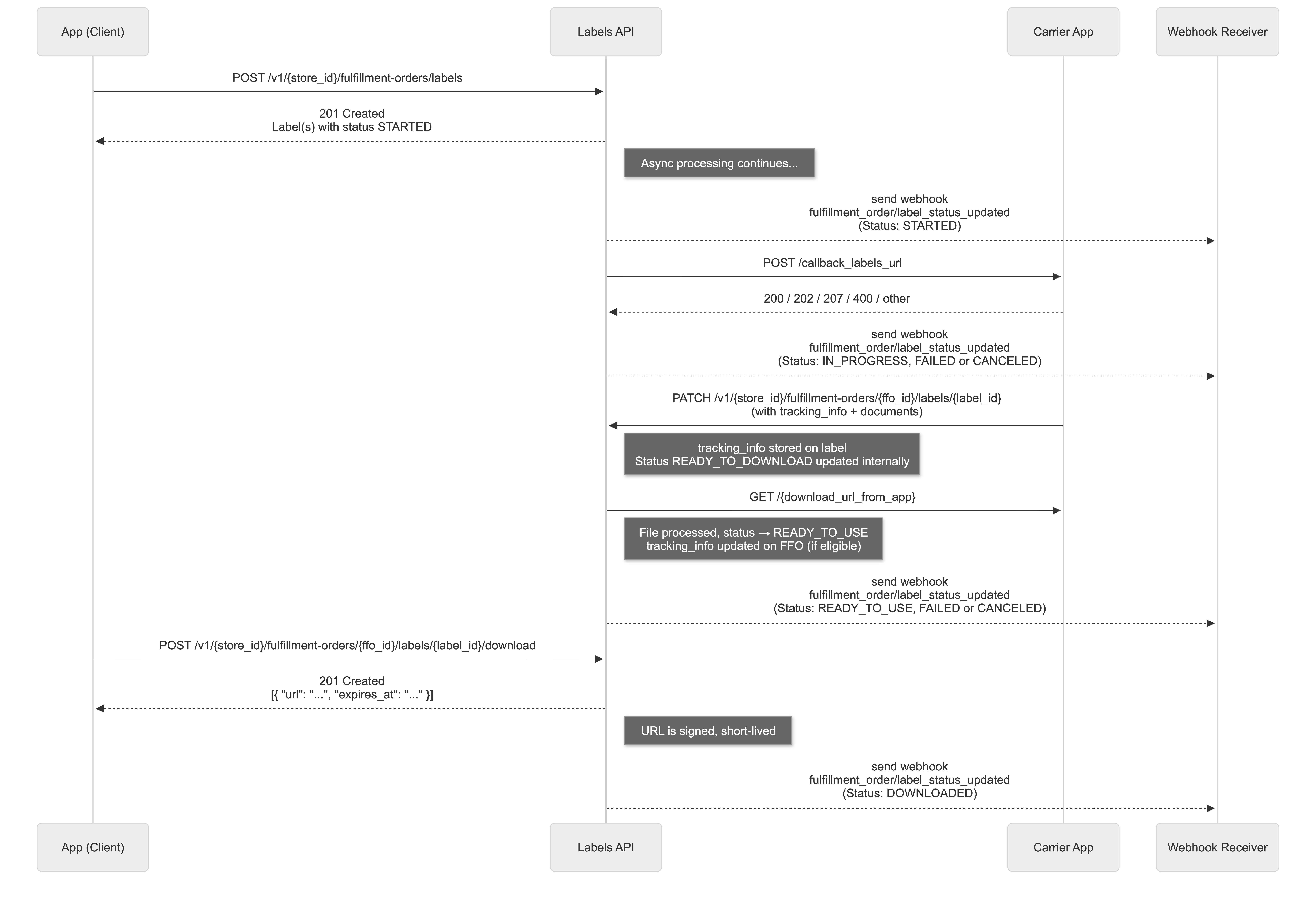
Properties
FulfillmentOrderLabel
| Field Name | Field Type | Description |
|---|
| id | ID | The unique label identification (ULID) |
| status | FulfillmentOrderLabelStatus | The current label status |
| status_history | FulfillmentOrderLabelStatusHistory[] | The label status update history. Default: [] |
| documents | FulfillmentOrderLabelDocument[] | The label documents list. Default: [] |
| tracking_info | FulfillmentOrderTrackingInfo | The label tracking information. Nullable. Default: null |
| requested_by | FulfillmentOrderLabelRequestedBy | Identification of who requested the label creation |
| created_at | DateTime | Date when the label was created in ISO 8601 format |
| updated_at | DateTime | Date when the label was last updated in ISO 8601 format |
FulfillmentOrderLabelStatus
| Type | Description |
|---|
| STARTED | Request initiated, awaiting processing by the app |
| IN_PROGRESS | App received the request and is processing the label |
| READY_TO_DOWNLOAD | Label generated by carrier, ready for internal download by Labels API |
| READY_TO_USE | Label already downloaded internally and available for use |
| DOWNLOADED | The label was downloaded by Labels API |
| SUSPENDED | Label was suspended (temporary or indefinite; may be reactivated) |
| FAILED | Processing failed |
| CANCELED | Label was canceled |
Webhook behavior:
All label status updates are notified by the webhook fulfillment_order/label_status_updated.
However, the intermediate status READY_TO_DOWNLOAD is not notified by webhook. This status is used during processing, and only after successful validation or failure, the next webhook is sent with the final status.
Status Workflow Rules:
- Expected Flow:
STARTED → IN_PROGRESS → [FAILED | CANCELED | READY_TO_USE] → DOWNLOADED
- Final Status Restriction: Labels in final statuses (
FAILED, CANCELED, READY_TO_USE, DOWNLOADED, SUSPENDED) cannot accept further status updates (except SUSPENDED → READY_TO_USE via reactivation)
- CANCELED Exception:
CANCELED status can be applied at any point in the workflow, except when the label is in READY_TO_DOWNLOAD (internal processing), terminal statuses (FAILED, CANCELED), or SUSPENDED
- SUSPENDED: Labels can only be suspended when in
READY_TO_USE or DOWNLOADED. Once suspended, the label can be reactivated to READY_TO_USE.
- No Backward Flow: Status updates cannot move backward to previous statuses or skip intermediate statuses
- Automatic Timeout: Labels that remain in
STARTED or IN_PROGRESS status for more than 30 minutes will be automatically marked as FAILED
- URL Lifecycle: The
download_url_from_app provided during READY_TO_DOWNLOAD is downloaded and stored internally by Nuvemshop. The partner may safely deactivate their original URL upon receiving the READY_TO_USE (or FAILED) webhook — no fixed TTL is required.
Carrier Override Rules (label creation):
- Default carrier: By default, every label is routed using the carrier defined on the fulfillment order (
shipping.carrier). This carrier determines which partner app receives the request via the configured callback.
- Override field: Each item of the
POST /fulfillment-orders/labels payload may include an optional carrier object ({ id, app_id }) that overrides the fulfillment order's default carrier for that label creation only. The fulfillment order itself is not modified.
- Override priority: When the
carrier field is provided in the request, it takes precedence over the fulfillment order's default carrier. Otherwise, the default carrier is used.
- Override validation: When
carrier is sent, the system validates that:
- The carrier exists and is enabled on the store. Otherwise the request fails with
400 Bad Request and reason CARRIER_NOT_FOUND ("Carrier '{id}' not found or disabled").
- The provided
app_id matches the carrier's actual app_id. Otherwise the request fails with 400 Bad Request ("Carrier '{id}' does not belong to app '{app_id}'").
- Carrier type bypass: Label generation is normally restricted to carriers with code
api or native. If the fulfillment order's default carrier is of a different type (e.g. custom, locale), the label is marked as FAILED with reason CARRIER_UNAVAILABLE_ERROR. Providing a carrier override bypasses this carrier-type restriction — the override is used as-is to route the request.
FulfillmentOrderLabelStatusHistory
| Field Name | Field Type | Description |
|---|
| from_status | FulfillmentOrderLabelStatus | The previous label status. Nullable |
| to_status | FulfillmentOrderLabelStatus | The new label status |
| reason | FulfillmentOrderLabelStatusReason | The reason for the status update (required for FAILED, CANCELED, SUSPENDED, and READY_TO_USE when reactivating from SUSPENDED) |
| app_id | String | The app identification that made the update |
| user_id | String | The user identification that made the update |
| happened_at | DateTime | Date when the status update happened in ISO 8601 format |
| created_at | DateTime | Date when the record was created in ISO 8601 format |
FulfillmentOrderLabelStatusReason
| Field Name | Field Type | Description |
|---|
| type | FulfillmentOrderLabelStatusReasonType | The type of status reason |
| message | String | Descriptive message for the reason |
FulfillmentOrderLabelStatusReasonType
| Type | Description |
|---|
| AUTHORIZATION_ERROR | Permission errors |
| BALANCE_ERROR | Insufficient balance |
| CARRIER_ERROR | Unmapped carrier error |
| CARRIER_UNAVAILABLE_ERROR | Carrier type not supported for label generation |
| CARRIER_NOT_FOUND | Carrier not found in the API |
| CARRIER_DOCUMENT_ERROR | Failed to download label documents from carrier |
| INSUFFICIENT_FUND_ERROR | Insufficient funds |
| LIMIT_ERROR | Limit reached (daily, quantity, etc.) |
| OTHER_ERROR | Generic error without categorization |
FulfillmentOrderLabelDocument
| Field Name | Field Type | Description |
|---|
| file_name | String | The label file name |
| type | FulfillmentOrderLabelDocumentType | The document type |
| format | FulfillmentOrderLabelDocumentFormatType | The technical format |
| size | Number | The file size in bytes. Nullable |
| url | String | The URL for document download, hosted by Nuvemshop once the label reaches READY_TO_USE. Nullable |
| created_at | DateTime | Date when the document was created in ISO 8601 format |
| updated_at | DateTime | Date when the document was last updated in ISO 8601 format |
FulfillmentOrderLabelDocumentType
| Type | Description |
|---|
| LABEL | Shipping label |
| CONTENT_DECLARATION | Shipping label content declaration |
| Type | Description |
|---|
| PDF | PDF format document |
| TXT | Plain text document |
| ZPL | Zebra printing format (ZPL) |
| HTML | HTML document |
| XML | XML document |
FulfillmentOrderLabelRequestedBy
| Field Name | Field Type | Description |
|---|
| app_id | String | The app identification that requested the label |
| user_id | String | The user identification that requested the label. Nullable |
CreateFulfillmentOrderLabelsRequest
| Field Name | Field Type | Mandatory | Nullable | Description |
|---|
| id | ID | ✅ | ❌ | The fulfillment order identification (ULID) |
| carrier | CarrierOverrideRequest | ❌ | ❌ | Optional carrier override for this fulfillment order. When provided, the label is generated against the supplied carrier instead of the fulfillment order's current carrier. |
CarrierOverrideRequest
| Field Name | Field Type | Mandatory | Nullable | Description |
|---|
| id | ID | ✅ | ❌ | The carrier identification. Must reference an existing and enabled carrier on the store — otherwise the request fails with 400 Bad Request (Carrier '<id>' not found or disabled). |
| app_id | String | ✅ | ❌ | The identification of the app that owns the carrier. Must match the carrier's owner app — otherwise the request fails with 400 Bad Request (Carrier '<id>' does not belong to app '<app_id>'). |
UpdateFulfillmentOrderLabelStatusRequest
| Field Name | Field Type | Mandatory | Nullable | Description |
|---|
| id | ID | ✅ | ❌ | The fulfillment order identification (ULID) |
| labels | LabelStatusRequest[] | ✅ | ❌ | Array of labels with status updates |
LabelStatusRequest
| Field Name | Field Type | Mandatory | Nullable | Description |
|---|
| id | ID | ✅ | ❌ | The label identification (ULID) |
| status | FulfillmentOrderLabelStatus | ✅ | ❌ | The new label status |
| reason | LabelReasonRequest | ❌ | ✅ | The reason for the change (required for FAILED/CANCELED) |
| documents | LabelDocumentRequest[] | ❌ | ✅ | Array of label documents (required for READY_TO_DOWNLOAD) |
| tracking_info | LabelTrackingInfoRequest | ❌ | ✅ | The tracking information for the label |
LabelReasonRequest
| Field Name | Field Type | Mandatory | Nullable | Description |
|---|
| type | FulfillmentOrderLabelStatusReasonType | ✅ | ❌ | The type of status reason |
| message | String | ✅ | ❌ | Descriptive message for the reason |
LabelDocumentRequest
| Field Name | Field Type | Mandatory | Nullable | Description |
|---|
| file_name | String | ❌ | ✅ | The file name |
| type | FulfillmentOrderLabelDocumentType | ✅ | ❌ | The document type (LABEL,CONTENT_DECLARATION) |
| format | FulfillmentOrderLabelDocumentFormatType | ✅ | ❌ | The technical format (PDF, TXT, ZPL, HTML, XML) |
| download_url_from_app | String | ✅ | ❌ | The download URL provided by the app. Must remain accessible until the READY_TO_USE or FAILED webhook is received. |
| size | Number | ❌ | ✅ | The file size in bytes |
LabelTrackingInfoRequest
| Field Name | Field Type | Mandatory | Nullable | Description |
|---|
| code | String | ❌ | ✅ | The tracking code (automatically converted to uppercase) |
| url | String | ❌ | ✅ | The tracking URL (must be a valid HTTP/HTTPS URL) |
Labels API Endpoints
POST /fulfillment-orders/labels
Create labels for multiple fulfillment orders.
Note: This endpoint triggers an asynchronous process that calls the carrier app's callback URL. See Request to Shipping Carrier: callback_labels_url for details.
URL values
| Field name | Field Type | Mandatory | Description |
|---|
| store_id | String | ✅ | Store identifier |
| Header | Field Type | Mandatory | Description |
|---|
| Authorization | String | ✅ | Bearer App token. Eg.: Bearer {app_token} |
| Content-type | String | ✅ | The request content-type "application/json" |
Notes
- Parameters are sent in body, JSON format
- Maximum of 50 fulfillment orders per request
- Maximum of 20 labels per fulfillment order (exceeding this limit will result in a 400 Bad Request error)
Request Payload
| Type | Description |
|---|
| CreateFulfillmentOrderLabelsRequest[] | Array of label creation requests |
[
  {
    "id": "01FHZXHK8PTP9FVK99Z66GXKKK"
  },
  {
    "id": "01FHZXHK8PTP9FVK99Z66GXLLL"
  }
]
Responses
HTTP 201 - Created
| Type | Description |
|---|
| FulfillmentOrderLabelsResponse | Array of created labels |
POST /fulfillment-orders/labels
[
  {
    "id": "01FHZXHK8PTP9FVK99Z66GXKKK",
    "labels": [
      {
        "id": "01GSB6KZXT0RTBA0CD4M4WXBSR",
        "requested_by": {
          "app_id": "12345",
          "user_id": "67890"
        },
        "status": "STARTED",
        "status_history": [
          {
            "from_status": null,
            "to_status": "STARTED",
            "reason": null,
            "app_id": "12345",
            "user_id": "67890",
            "happened_at": "2025-08-10T10:00:00Z",
            "created_at": "2025-08-10T10:00:00Z"
          }
        ],
        "documents": [],
        "created_at": "2025-08-10T10:00:00Z",
        "updated_at": "2025-08-10T10:00:00Z"
      }
    ]
  }
]
HTTP 400 - Bad Request
| Type | Description |
|---|
| Error | The Bad Request Error Response |
Labels limit per fulfillment order exceeded:
{
  "code": "bad_request",
  "message": "Fulfillment order 01FHZXHK8PTP9FVK99Z66GXKKK already has the maximum number of labels (20)"
}
Request limit exceeded:
{
  "code": "bad_request",
  "message": "Maximum 200 fulfillment orders allowed"
}
Cannot create labels for deleted orders:
{
  "code": "bad_request",
  "message": "Cannot create labels for deleted orders: 01FHZXHK8PTP9FVK99Z66GXKKK"
}
Carrier type not supported:
{
  "code": "bad_request",
  "message": "Carrier type 'custom' is not supported for label generation.",
  "reason": {
    "type": "CARRIER_UNAVAILABLE_ERROR",
    "message": "Carrier type 'custom' is not supported for label generation."
  }
}
Carrier not found:
{
  "code": "bad_request",
  "message": "Carrier '123456' not found or disabled",
  "reason": {
    "type": "CARRIER_NOT_FOUND",
    "message": "Carrier '123456' not found or disabled"
  }
}
Authorization error:
{
  "code": "bad_request",
  "message": "Authorization error",
  "reason": {
    "type": "AUTHORIZATION_ERROR",
    "message": "App does not have permission to generate labels for this carrier"
  }
}
Balance error:
{
  "code": "bad_request",
  "message": "Balance error",
  "reason": {
    "type": "BALANCE_ERROR",
    "message": "Insufficient balance in carrier account to generate label"
  }
}
Carrier error:
{
  "code": "bad_request",
  "message": "Carrier error",
  "reason": {
    "type": "CARRIER_ERROR",
    "message": "Unexpected error from carrier: Service temporarily unavailable"
  }
}
Insufficient funds error:
{
  "code": "bad_request",
  "message": "Insufficient funds",
  "reason": {
    "type": "INSUFFICIENT_FUND_ERROR",
    "message": "Insufficient funds in carrier account. Current balance: R$ 5.00, required: R$ 15.50"
  }
}
Limit error:
{
  "code": "bad_request",
  "message": "Limit exceeded",
  "reason": {
    "type": "LIMIT_ERROR",
    "message": "Daily label generation limit reached. Maximum: 1000 labels per day"
  }
}
Other error:
{
  "code": "bad_request",
  "message": "Label generation failed",
  "reason": {
    "type": "OTHER_ERROR",
    "message": "An unexpected error occurred while processing the label request"
  }
}
HTTP 401 - Unauthorized
| Type | Description |
|---|
| Error | The Unauthorized Error Response |
HTTP 404 - Not Found
| Type | Description |
|---|
| Error | The Not Found Error Response |
Fulfillment orders not found:
{
  "code": "not_found",
  "message": "Fulfillment order(s) not found: 01FHZXHK8PTP9FVK99Z66GXKKK, 01FHZXHK8PTP9FVK99Z66GXLLL for store 1000"
}
HTTP 422 - Unprocessable Entity
| Type | Description |
|---|
| Error | The Unprocessable Entity Error Response |
PATCH /fulfillment-orders/{fulfillment_order_id}/labels/{label_id}
Update the status of a specific label for a fulfillment order.

URL values
| Field name | Field Type | Mandatory | Description |
|---|
| store_id | String | ✅ | Store identifier |
| fulfillment_order_id | String | ✅ | Fulfillment order identifier (ULID) |
| label_id | String | ✅ | Label identifier (ULID) |
| Header | Field Type | Mandatory | Description |
|---|
| Authorization | String | ✅ | Bearer App token. Eg.: Bearer {app_token} |
| Content-type | String | ✅ | The request content-type "application/json" |
Notes
- Parameters are sent in body, JSON format
- Allowed statuses for update: READY_TO_DOWNLOAD, FAILED, CANCELED, SUSPENDED, READY_TO_USE
- For FAILED, CANCELED or SUSPENDED status, the reason field is required
- For READY_TO_DOWNLOAD status, the documents field is required
- For READY_TO_USE status (reactivation from SUSPENDED), the reason field is required
- Status update restrictions apply - see Status Workflow Rules for complete validation rules
Tracking Info Rules
| Status | tracking_info Behavior |
|---|
READY_TO_DOWNLOAD | If provided, stored on the label. When label transitions to READY_TO_USE, it will update the FFO if it's the most recent eligible label |
FAILED | If label's tracking code matches FFO's tracking, system recalculates from next eligible label or clears FFO tracking |
CANCELED | If label's tracking code matches FFO's tracking, system recalculates from next eligible label or clears FFO tracking |
SUSPENDED | If label's tracking code matches FFO's tracking, system recalculates from next eligible label or clears FFO tracking |
Important: The tracking_info provided in READY_TO_DOWNLOAD is stored on the label immediately. However, the update to the fulfillment order only occurs when the label reaches READY_TO_USE status (after internal download processing).
Request Payload
| Type | Description |
|---|
| LabelStatusRequest | Label status update request |
{
  "status": "READY_TO_DOWNLOAD",
  "tracking_info": {
    "code": "AA123456789BR",
    "url": "https://rastreamento.correios.com.br/app/index.php"
  },
  "documents": [
    {
      "file_name": "label_123.pdf",
      "type": "LABEL",
      "format": "PDF",
      "download_url_from_app": "https://app.download_labels.com/label_123.pdf",
      "size": 1024
    }
  ]
}
Responses
HTTP 200 - Ok
| Type | Description |
|---|
| FulfillmentOrderLabelsResponse | Updated label |
PATCH /1000/fulfillment-orders/01FHZXHK8PTP9FVK99Z66GXKKK/labels/01GSB6KZXT0RTBA0CD4M4WXBSR
{
  "id": "01GSB6KZXT0RTBA0CD4M4WXBSR",
  "requested_by": {
    "app_id": "12345",
    "user_id": "67890"
  },
  "status": "READY_TO_DOWNLOAD",
  "tracking_info": {
    "code": "AA123456789BR",
    "url": "https://rastreamento.correios.com.br/app/index.php"
  },
  "status_history": [
    {
      "from_status": null,
      "to_status": "STARTED",
      "reason": null,
      "app_id": "12345",
      "user_id": "67890",
      "happened_at": "2025-08-10T10:00:00Z",
      "created_at": "2025-08-10T10:00:00Z"
    },
    {
      "from_status": "STARTED",
      "to_status": "READY_TO_DOWNLOAD",
      "reason": null,
      "app_id": "12345",
      "user_id": "67890",
      "happened_at": "2025-08-10T10:05:00Z",
      "created_at": "2025-08-10T10:05:00Z"
    }
  ],
  "documents": [
    {
      "file_name": "label_123.pdf",
      "type": "LABEL",
      "format": "PDF",
      "size": 1024,
      "created_at": "2025-08-10T10:05:00Z",
      "updated_at": "2025-08-10T10:05:00Z"
    }
  ],
  "created_at": "2025-08-10T10:00:00Z",
  "updated_at": "2025-08-10T10:05:00Z"
}
HTTP 400 - Bad Request
| Type | Description |
|---|
| Error | The Bad Request Error Response |
Invalid status:
{
  "code": "bad_request",
  "message": "Invalid status IN_PROGRESS. Allowed statuses: READY_TO_DOWNLOAD, FAILED, CANCELED, SUSPENDED"
}
Invalid status transition:
{
  "code": "bad_request",
  "message": "Cannot change status from terminal status CANCELED to READY_TO_DOWNLOAD."
}
Status requires a reason:
{
  "code": "bad_request",
  "message": "Status FAILED requires a reason"
}
Cannot cancel label that is ready to download:
{
  "code": "bad_request",
  "message": "Cannot cancel label that is ready to download"
}
Documents can only be provided for READY_TO_DOWNLOAD status:
{
  "code": "bad_request",
  "message": "Documents can only be provided when status is READY_TO_DOWNLOAD"
}
Document download error:
{
  "code": "bad_request",
  "message": "Failed to download documents: Empty response from carrier when downloading label",
  "reason": {
    "type": "CARRIER_DOCUMENT_ERROR",
    "message": "Failed to download documents: Empty response from carrier when downloading label"
  }
}
Authorization error:
{
  "code": "bad_request",
  "message": "Authorization error",
  "reason": {
    "type": "AUTHORIZATION_ERROR",
    "message": "App does not have permission to generate labels for this carrier"
  }
}
Balance error:
{
  "code": "bad_request",
  "message": "Balance error",
  "reason": {
    "type": "BALANCE_ERROR",
    "message": "Insufficient balance in carrier account to generate label"
  }
}
Carrier error:
{
  "code": "bad_request",
  "message": "Carrier error",
  "reason": {
    "type": "CARRIER_ERROR",
    "message": "Unexpected error from carrier: Service temporarily unavailable"
  }
}
Insufficient funds error:
{
  "code": "bad_request",
  "message": "Insufficient funds",
  "reason": {
    "type": "INSUFFICIENT_FUND_ERROR",
    "message": "Insufficient funds in carrier account. Current balance: R$ 5.00, required: R$ 15.50"
  }
}
Limit error:
{
  "code": "bad_request",
  "message": "Limit exceeded",
  "reason": {
    "type": "LIMIT_ERROR",
    "message": "Daily label generation limit reached. Maximum: 1000 labels per day"
  }
}
Other error:
{
  "code": "bad_request",
  "message": "Label generation failed",
  "reason": {
    "type": "OTHER_ERROR",
    "message": "An unexpected error occurred while processing the label request"
  }
}
HTTP 401 - Unauthorized
| Type | Description |
|---|
| Error | The Unauthorized Error Response |
HTTP 404 - Not Found
| Type | Description |
|---|
| Error | The Not Found Error Response |
Label not found:
{
  "code": "not_found",
  "message": "Label 01GSB6KZXT0RTBA0CD4M4WXBSR not found in fulfillment order 01FHZXHK8PTP9FVK99Z66GXKKK"
}
Fulfillment order not found:
{
  "code": "not_found",
  "message": "Fulfillment order 01FHZXHK8PTP9FVK99Z66GXKKK not found for store 1000"
}
HTTP 422 - Unprocessable Entity
| Type | Description |
|---|
| Error | The Unprocessable Entity Error Response |
PATCH /fulfillment-orders/labels/status
Update the status of multiple labels for multiple fulfillment orders in a single request.
URL values
| Field name | Field Type | Mandatory | Description |
|---|
| store_id | String | ✅ | Store identifier |
| Header | Field Type | Mandatory | Description |
|---|
| Authorization | String | ✅ | Bearer App token. Eg.: Bearer {app_token} |
| Content-type | String | ✅ | The request content-type "application/json" |
Notes
- Parameters are sent in body, JSON format
- Maximum of 200 fulfillment orders per request
- Each fulfillment order must have between 1 and 10 labels to update
- Only unique labels can be listed within the 10 possible labels per fulfillment order
- Allowed statuses for update: READY_TO_DOWNLOAD, FAILED, CANCELED, SUSPENDED, READY_TO_USE
- For FAILED, CANCELED or SUSPENDED status, the reason field is required
- For READY_TO_DOWNLOAD status, the documents field is required
- For READY_TO_USE status (reactivation from SUSPENDED), the reason field is required
- Status update restrictions apply - see Status Workflow Rules for complete validation rules
Tracking Info Rules
| Status | tracking_info Behavior |
|---|
READY_TO_DOWNLOAD | If provided, stored on the label. When label transitions to READY_TO_USE, it will update the FFO if it's the most recent eligible label |
FAILED | If label's tracking code matches FFO's tracking, system recalculates from next eligible label or clears FFO tracking |
CANCELED | If label's tracking code matches FFO's tracking, system recalculates from next eligible label or clears FFO tracking |
SUSPENDED | If label's tracking code matches FFO's tracking, system recalculates from next eligible label or clears FFO tracking |
Important: The tracking_info provided in READY_TO_DOWNLOAD is stored on the label immediately. However, the update to the fulfillment order only occurs when the label reaches READY_TO_USE status (after internal download processing).
Request Payload
| Type | Description |
|---|
| UpdateFulfillmentOrderLabelStatusRequest[] | Array of label status update requests |
[
  {
    "id": "01FHZXHK8PTP9FVK99Z66GXKKK",
    "labels": [
      {
        "id": "01GSB6KZXT0RTBA0CD4M4WXBSR",
        "status": "READY_TO_DOWNLOAD",
        "tracking_info": {
          "code": "AA123456789BR",
          "url": "https://rastreamento.correios.com.br/app/index.php"
        },
        "documents": [
          {
            "file_name": "label_123.pdf",
            "type": "LABEL",
            "format": "PDF",
            "download_url_from_app": "https://app.download_labels.com/label_123.pdf",
            "size": 1024
          }
        ]
      }
    ]
  },
  {
    "id": "01FHZXHK8PTP9FVK99Z66GXLLL",
    "labels": [
      {
        "id": "01GSB6KZXT0RTBA0CD4M4WXBST",
        "status": "FAILED",
        "reason": {
          "type": "BALANCE_ERROR",
          "message": "Insufficient balance to process this label"
        }
      }
    ]
  }
]
Responses
HTTP 200 - Ok
| Type | Description |
|---|
| FulfillmentOrderLabelsResponse[] | Array of updated labels grouped by fulfillment order |
PATCH /1000/fulfillment-orders/labels/status
[
  {
    "id": "01FHZXHK8PTP9FVK99Z66GXKKK",
    "labels": [
      {
        "id": "01GSB6KZXT0RTBA0CD4M4WXBSR",
        "requested_by": {
          "app_id": "12345",
          "user_id": "67890"
        },
        "status": "READY_TO_DOWNLOAD",
        "tracking_info": {
          "code": "AA123456789BR",
          "url": "https://rastreamento.correios.com.br/app/index.php"
        },
        "status_history": [
          {
            "from_status": null,
            "to_status": "STARTED",
            "reason": null,
            "app_id": "12345",
            "user_id": "67890",
            "happened_at": "2025-08-10T10:00:00Z",
            "created_at": "2025-08-10T10:00:00Z"
          },
          {
            "from_status": "STARTED",
            "to_status": "IN_PROGRESS",
            "reason": null,
            "app_id": "12345",
            "user_id": "67890",
            "happened_at": "2025-08-10T10:02:00Z",
            "created_at": "2025-08-10T10:02:00Z"
          },
          {
            "from_status": "IN_PROGRESS",
            "to_status": "READY_TO_DOWNLOAD",
            "reason": null,
            "app_id": "12345",
            "user_id": "67890",
            "happened_at": "2025-08-10T10:05:00Z",
            "created_at": "2025-08-10T10:05:00Z"
          }
        ],
        "documents": [
          {
            "file_name": "label_123.pdf",
            "type": "LABEL",
            "format": "PDF",
            "size": 1024,
            "created_at": "2025-08-10T10:05:00Z",
            "updated_at": "2025-08-10T10:05:00Z"
          }
        ],
        "created_at": "2025-08-10T10:00:00Z",
        "updated_at": "2025-08-10T10:05:00Z"
      }
    ]
  },
  {
    "id": "01FHZXHK8PTP9FVK99Z66GXLLL",
    "labels": [
      {
        "id": "01GSB6KZXT0RTBA0CD4M4WXBST",
        "requested_by": {
          "app_id": "12345",
          "user_id": "67890"
        },
        "status": "FAILED",
        "status_history": [
          {
            "from_status": null,
            "to_status": "STARTED",
            "reason": null,
            "app_id": "12345",
            "user_id": "67890",
            "happened_at": "2025-08-10T10:00:00Z",
            "created_at": "2025-08-10T10:00:00Z"
          },
          {
            "from_status": "STARTED",
            "to_status": "IN_PROGRESS",
            "reason": null,
            "app_id": "12345",
            "user_id": "67890",
            "happened_at": "2025-08-10T10:02:00Z",
            "created_at": "2025-08-10T10:02:00Z"
          },
          {
            "from_status": "IN_PROGRESS",
            "to_status": "FAILED",
            "reason": {
              "type": "BALANCE_ERROR",
              "message": "Insufficient balance to process this label"
            },
            "app_id": "12345",
            "user_id": "67890",
            "happened_at": "2025-08-10T10:05:00Z",
            "created_at": "2025-08-10T10:05:00Z"
          }
        ],
        "documents": [],
        "created_at": "2025-08-10T10:00:00Z",
        "updated_at": "2025-08-10T10:05:00Z"
      }
    ]
  }
]
HTTP 400 - Bad Request
| Type | Description |
|---|
| Error | The Bad Request Error Response |
Request limit exceeded:
{
  "code": "bad_request",
  "message": "Maximum 200 fulfillment orders allowed"
}
Invalid status:
{
  "code": "bad_request",
  "message": "Invalid status IN_PROGRESS. Allowed statuses: READY_TO_DOWNLOAD, FAILED, CANCELED, SUSPENDED"
}
Invalid status transition:
{
  "code": "bad_request",
  "message": "Cannot change status from terminal status CANCELED to READY_TO_DOWNLOAD."
}
Status requires a reason:
{
  "code": "bad_request",
  "message": "Status FAILED requires a reason"
}
Cannot cancel label that is ready to download:
{
  "code": "bad_request",
  "message": "Cannot cancel label that is ready to download"
}
Documents can only be provided for READY_TO_DOWNLOAD status:
{
  "code": "bad_request",
  "message": "Documents can only be provided when status is READY_TO_DOWNLOAD"
}
Document download error:
{
  "code": "bad_request",
  "message": "Failed to download documents: Empty response from carrier when downloading label",
  "reason": {
    "type": "CARRIER_DOCUMENT_ERROR",
    "message": "Failed to download documents: Empty response from carrier when downloading label"
  }
}
Authorization error:
{
  "code": "bad_request",
  "message": "Authorization error",
  "reason": {
    "type": "AUTHORIZATION_ERROR",
    "message": "App does not have permission to generate labels for this carrier"
  }
}
Balance error:
{
  "code": "bad_request",
  "message": "Balance error",
  "reason": {
    "type": "BALANCE_ERROR",
    "message": "Insufficient balance in carrier account to generate label"
  }
}
Carrier error:
{
  "code": "bad_request",
  "message": "Carrier error",
  "reason": {
    "type": "CARRIER_ERROR",
    "message": "Unexpected error from carrier: Service temporarily unavailable"
  }
}
Insufficient funds error:
{
  "code": "bad_request",
  "message": "Insufficient funds",
  "reason": {
    "type": "INSUFFICIENT_FUND_ERROR",
    "message": "Insufficient funds in carrier account. Current balance: R$ 5.00, required: R$ 15.50"
  }
}
Limit error:
{
  "code": "bad_request",
  "message": "Limit exceeded",
  "reason": {
    "type": "LIMIT_ERROR",
    "message": "Daily label generation limit reached. Maximum: 1000 labels per day"
  }
}
Other error:
{
  "code": "bad_request",
  "message": "Label generation failed",
  "reason": {
    "type": "OTHER_ERROR",
    "message": "An unexpected error occurred while processing the label request"
  }
}
HTTP 401 - Unauthorized
| Type | Description |
|---|
| Error | The Unauthorized Error Response |
HTTP 422 - Unprocessable Entity
| Type | Description |
|---|
| Error | The Unprocessable Entity Error Response |
Label Cancellation
Label cancellation is performed through the CANCELED status and features an integrated flow with carriers to ensure consistency between systems.
Cancellation Scenarios
Label cancellation can occur in different scenarios, each with its specific flow:
Scenario 1: Merchant - Approved Cancellation
When a merchant requests cancellation and the carrier approves:
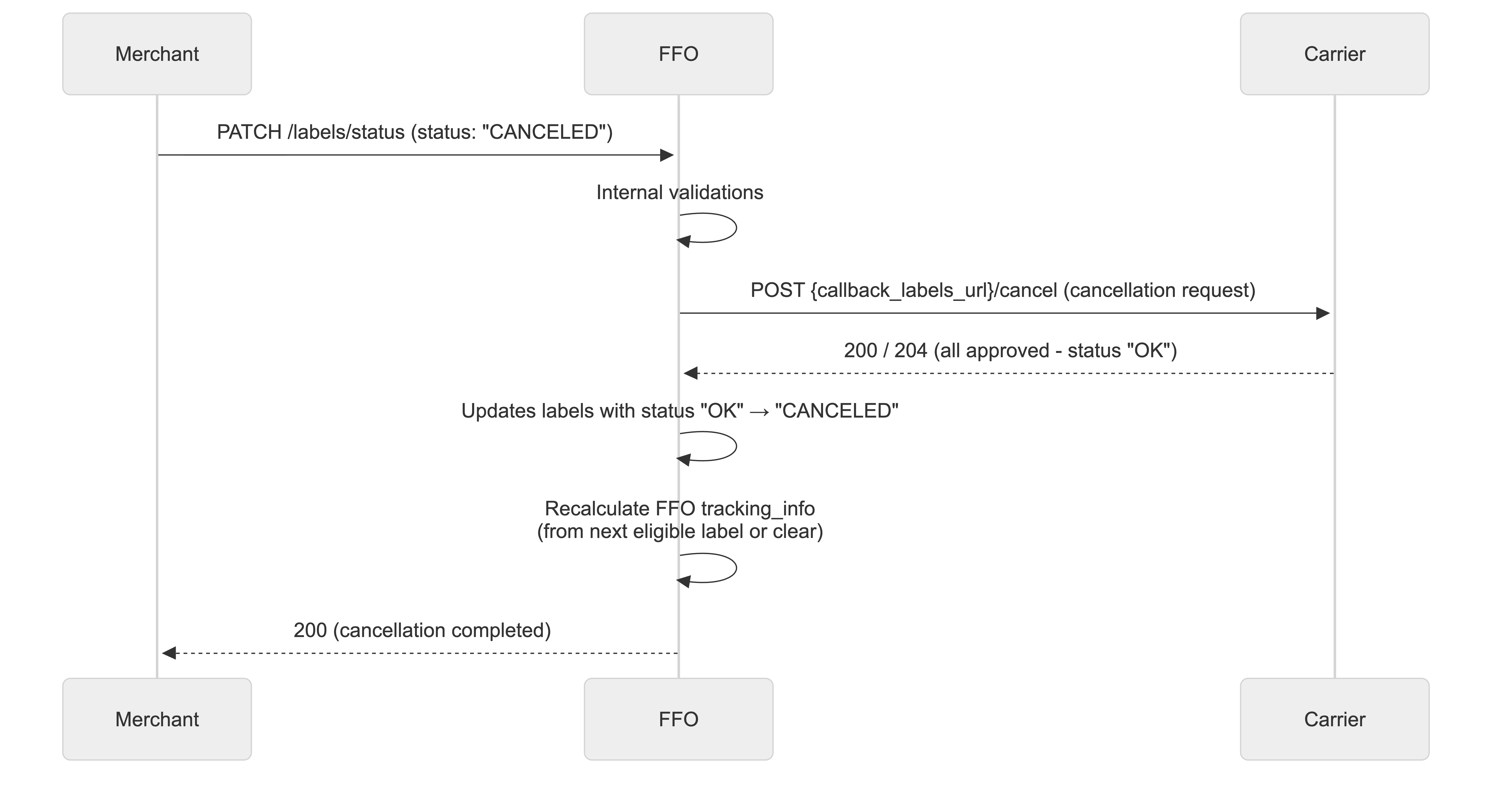
Scenario 2: Merchant - Rejected Cancellation (Partial or Total)
When a merchant requests cancellation and the carrier rejects (totally or partially):
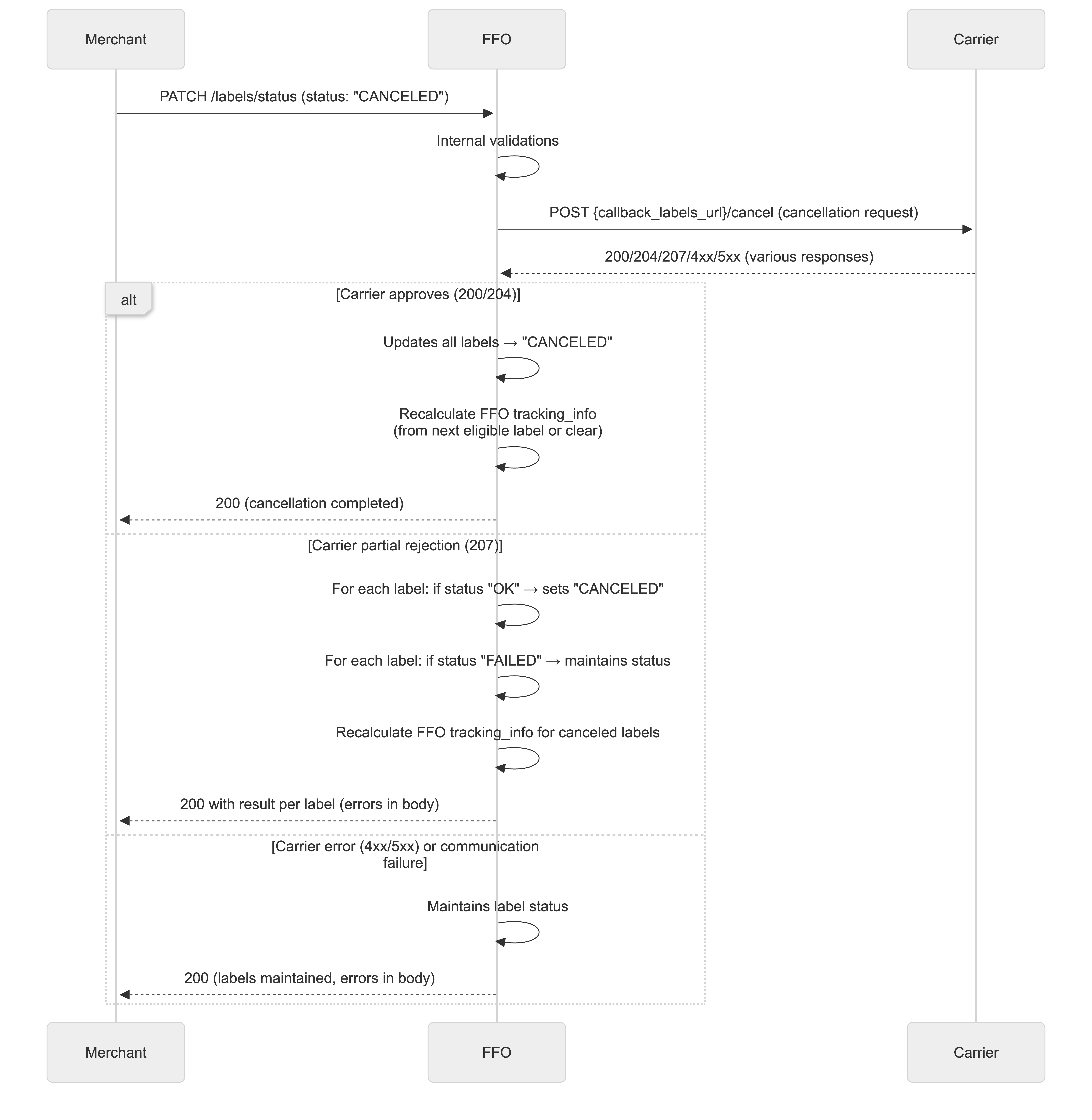
Scenario 3: Carrier Cancels Own Label
When the carrier itself requests cancellation of its own label:
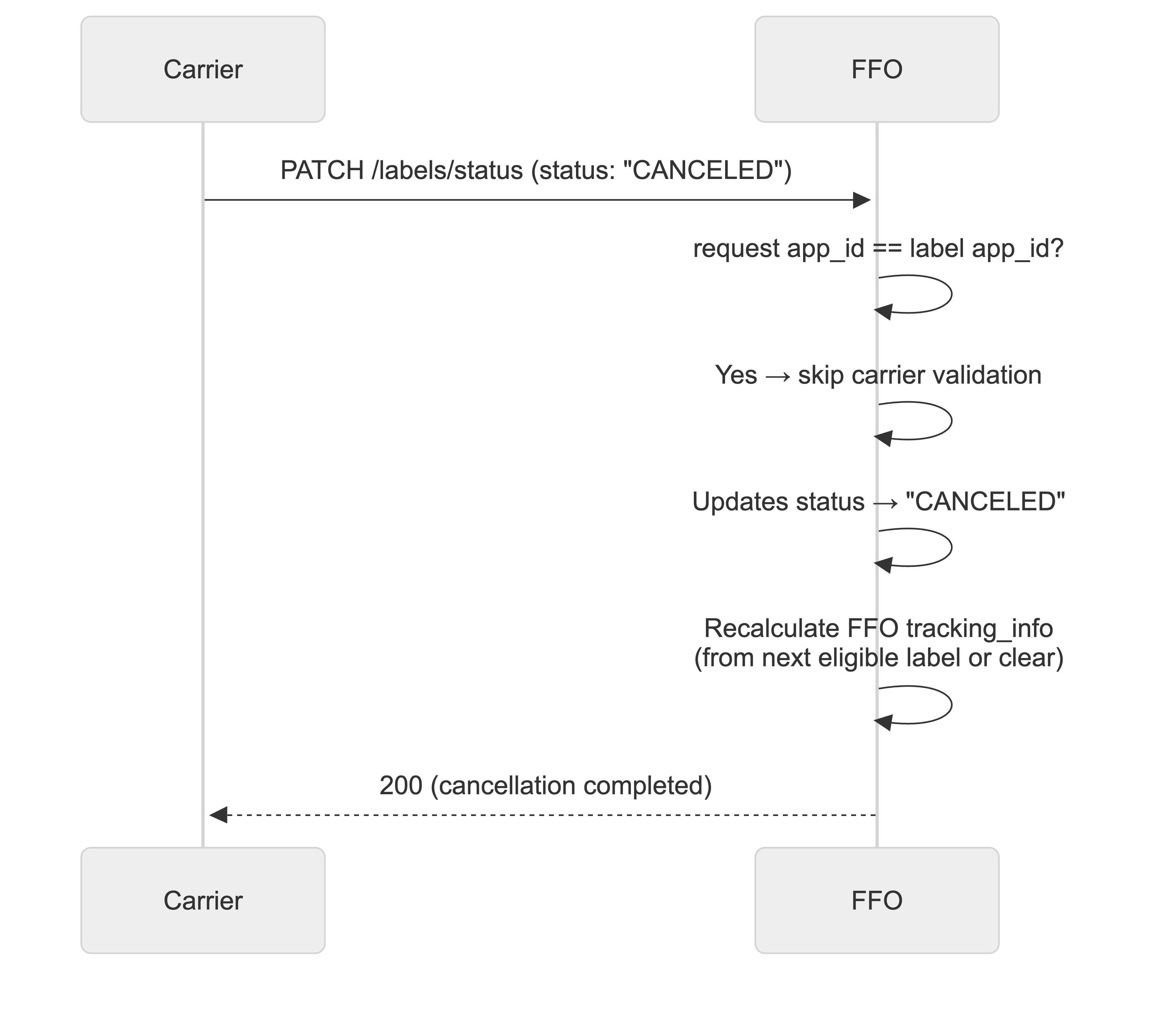
Scenario 4: Merchant with Carrier Without Callback
When a merchant requests cancellation but the carrier doesn't have callback_labels_url:
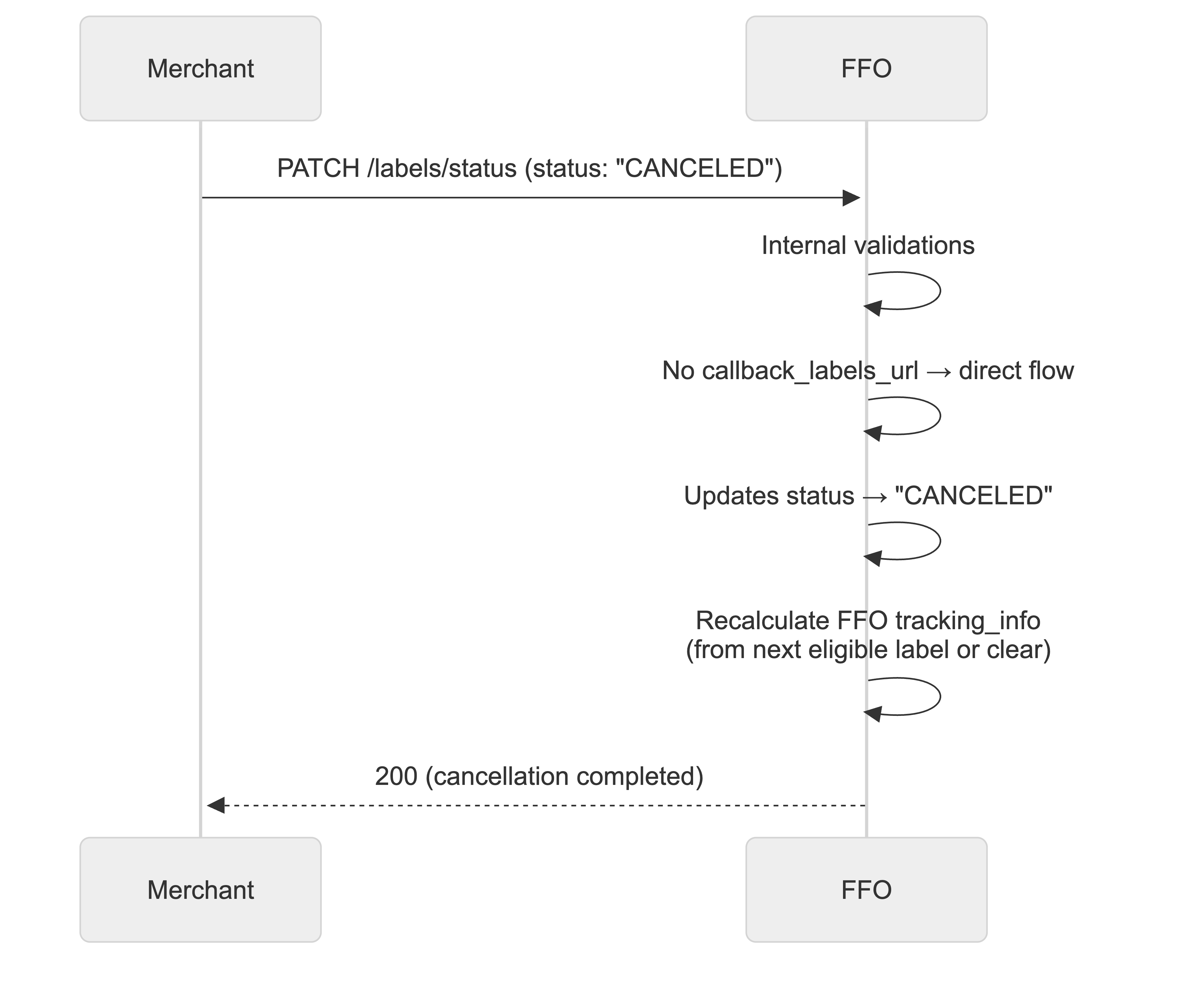
Origin Validation
The system differentiates between cancellations requested by merchants and carriers:
| Origin | Condition | Behavior |
|---|
| Merchant | Request app_id ≠ label app_id | Consults carrier before canceling |
| Carrier | Request app_id = label app_id | Cancels directly (skips carrier validation) |
Carrier Integration
For labels whose carrier has callback_labels_url registered, FFO makes a POST request to {callback_labels_url}/cancel:
POST {callback_labels_url}/cancel
Content-Type: application/json

{
  "labels": [
    { "fulfillment_order_id": "FFO-123", "label_id": "LBL-456" },
    { "fulfillment_order_id": "FFO-124", "label_id": "LBL-789" }
  ]
}
Carrier Responses
| HTTP Status | Meaning | FFO Action |
|---|
200 / 204 | All approved | Updates to CANCELED |
207 | Partial results | Processes individually |
4xx / 5xx | All rejected | Keeps original status |
Partial Response Example (207)
{
  "labels": [
    {
      "fulfillment_order_id": "FFO-123",
      "label_id": "LBL-456",
      "status": "OK"
    },
    {
      "fulfillment_order_id": "FFO-124",
      "label_id": "LBL-789",
      "status": "FAILED",
      "reason": {
        "code": "LABEL_IN_TRANSIT",
        "message": "Label is already in transit"
      }
    }
  ]
}
Carrier Rejection Codes
Carriers use standardized codes in the reason.code field:
| Type | Description |
|---|
| LABEL_IN_TRANSIT | Label is already in transit |
| LABEL_DELIVERED | Label has already been delivered |
| CANCELLATION_WINDOW_EXPIRED | Cancellation window has expired |
| CARRIER_SYSTEM_ERROR | Carrier internal error |
| CARRIER_POLICY_VIOLATION | Carrier policy violation |
| INSUFFICIENT_PERMISSIONS | Insufficient permissions |
| CARRIER_CANCELLATION_REJECTED | Cancellation rejected by carrier |
Merchant Cancellation Example
Request:
[
  {
    "id": "01FHZXHK8PTP9FVK99Z66GXKKK",
    "labels": [
      {
        "id": "01GSB6KZXT0RTBA0CD4M4WXBSR",
        "status": "CANCELED",
        "reason": {
          "type": "OTHER_ERROR",
          "message": "Cancellation requested by user"
        }
      }
    ]
  }
]
Success response:
[
  {
    "id": "01FHZXHK8PTP9FVK99Z66GXKKK",
    "labels": [
      {
        "id": "01GSB6KZXT0RTBA0CD4M4WXBSR",
        "requested_by": {
          "app_id": "12345",
          "user_id": "67890"
        },
        "status": "CANCELED",
        "status_history": [...],
        "documents": [],
        "created_at": "2025-08-10T10:00:00Z",
        "updated_at": "2025-08-10T10:10:00Z"
      }
    ]
  }
]
Rejected Cancellation Example
When the carrier rejects the cancellation, the response will include error details:
[
  {
    "id": "01FHZXHK8PTP9FVK99Z66GXKKK",
    "labels": [
      {
        "id": "01GSB6KZXT0RTBA0CD4M4WXBSR",
        "requested_by": {
          "app_id": "12345",
          "user_id": "67890"
        },
        "status": "READY_TO_USE",
        "error": {
          "code": "LABEL_IN_TRANSIT",
          "message": "Label is already in transit"
        },
        "status_history": [...],
        "documents": [...],
        "created_at": "2025-08-10T10:00:00Z",
        "updated_at": "2025-08-10T10:10:00Z"
      }
    ]
  }
]
Legacy Label Compatibility
For labels that do not have callback_labels_url registered, cancellation follows the traditional direct flow, without carrier consultation.
Label Suspension
Label suspension follows the same flow as Label Cancellation, with different status rules and semantics. Unlike cancellation (which is definitive), suspension can be temporary—though it is not necessarily so. Apps that support suspension must implement the callback endpoint POST {callback_labels_url}/suspension, in the same way they implement POST {callback_labels_url}/cancel for cancellation.
Status validation for suspension
Labels can only be suspended when in one of the following statuses:
| Allowed current status | Description |
|---|
READY_TO_USE | Label is ready and available for use |
DOWNLOADED | Label was downloaded by Labels API |
No other statuses are accepted for suspension.
Origin validation (suspension)
Same behavior as cancellation:
| Origin | Condition | Behavior |
|---|
| Merchant | Request app_id ≠ label app_id | Consults carrier via callback before suspending |
| Carrier | Request app_id = label app_id | Suspension is automatically approved (no carrier validation) |
Carrier integration (suspension)
For carriers with callback_labels_url registered, FFO sends:
POST {callback_labels_url}/suspension
Content-Type: application/json

{
  "labels": [
    { "fulfillment_order_id": "FFO-123", "label_id": "LBL-456" },
    { "fulfillment_order_id": "FFO-124", "label_id": "LBL-789" }
  ]
}
Response contract (HTTP status and payload structure) is the same as for Label Cancellation. On success, labels are updated to status SUSPENDED.
Legacy (no callback)
For labels whose carrier does not have callback_labels_url, suspension is not available; the flow is equivalent to cancellation without callback (direct update only when applicable by policy).
Label Reactivation
Label reactivation allows a suspended label to return to active use. The flow follows the same pattern as cancellation and suspension (including carrier callback when the requesting app is not the label issuer). The only status accepted for reactivation is SUSPENDED; once reactivated, the label returns to READY_TO_USE.
Status validation for reactivation
| Allowed current status | Result after reactivation |
|---|
SUSPENDED | READY_TO_USE |
No other statuses are accepted for reactivation.
Origin validation (reactivation)
Same as cancellation and suspension:
| Origin | Condition | Behavior |
|---|
| Merchant | Request app_id ≠ label app_id | Consults carrier via callback before reactivating |
| Carrier | Request app_id = label app_id | Reactivation is automatically approved |
Carrier integration (reactivation)
For carriers with callback_labels_url registered, FFO sends:
POST {callback_labels_url}/reactivate
Content-Type: application/json

{
  "labels": [
    { "fulfillment_order_id": "FFO-123", "label_id": "LBL-456" },
    { "fulfillment_order_id": "FFO-124", "label_id": "LBL-789" }
  ]
}
Response contract (HTTP status and payload structure) is the same as for Label Cancellation. On success, labels are updated from SUSPENDED to READY_TO_USE.
Automatic Tracking Info Update
The system automatically updates tracking_info between labels and fulfillment orders to ensure customers always have access to the most up-to-date tracking data.
How It Works
When a carrier provides tracking_info via the label status update endpoint (PATCH), the system stores this information on the label. Once the label transitions to an eligible status (READY_TO_USE or DOWNLOADED), the system automatically updates the tracking information on the parent fulfillment order.
Update Triggers
| Trigger | Label Status | Action |
|---|
| Label receives tracking via carrier callback | READY_TO_USE | SET - Update tracking on FFO |
| Label is downloaded | DOWNLOADED | NOOP - Already updated at READY_TO_USE |
| Label is canceled | CANCELED | RECALCULATE - Find next eligible or clear |
| Label is suspended | SUSPENDED | RECALCULATE - Find next eligible or clear |
| Label fails | FAILED | RECALCULATE - Find next eligible or clear |
Eligible Label Statuses
Only labels with the following statuses are considered eligible for tracking update:
| Status | Eligible | Description |
|---|
READY_TO_USE | ✅ | Label is ready and can be used |
DOWNLOADED | ✅ | Label has been downloaded |
STARTED | ❌ | Label creation initiated |
IN_PROGRESS | ❌ | Label is being processed |
CANCELED | ❌ | Label was canceled |
SUSPENDED | ❌ | Label was suspended |
FAILED | ❌ | Label creation failed |
SET Behavior (Label becomes eligible)
When a label transitions to READY_TO_USE with tracking_info:
- System identifies all eligible labels in the FFO
- Selects the most recent eligible label (by
updated_at)
- Updates FFO's
tracking_info from that label
- Creates entry in
tracking_info_history
RECALCULATE Behavior (Label becomes non-eligible)
When a label transitions to CANCELED, SUSPENDED, or FAILED:
- System checks if FFO's
tracking_info.code matches the removed label's code
- If match found:
- Searches for the next most recent eligible label with
tracking_info
- If found: Sets FFO tracking from that label
- If not found: Clears FFO
tracking_info (sets to null)
- If no match: No operation (tracking was from another label)
- Creates entry in
tracking_info_history recording the change
Multiple Labels Scenario
When an FFO has multiple labels with tracking_info:
- The most recent eligible label (by
updated_at) determines the FFO's tracking
- If that label is canceled/failed, tracking falls back to the next most recent eligible label
- If no eligible labels remain,
tracking_info is cleared
POST /fulfillment-orders/{fulfillment_order_id}/labels/{label_id}/download
Generate a signed download URL for the label file.
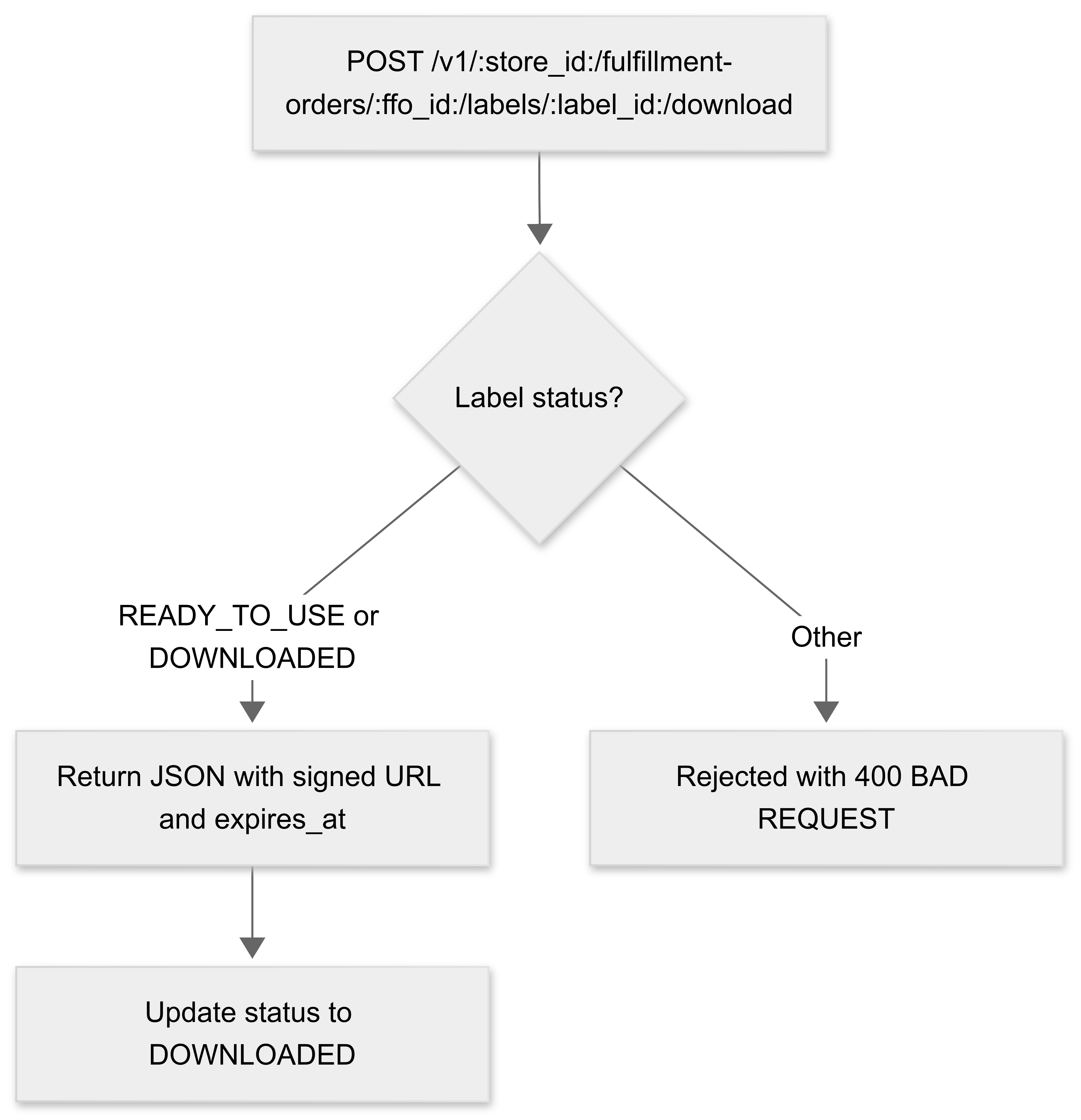
URL values
| Field name | Field Type | Mandatory | Description |
|---|
| store_id | String | ✅ | Store identifier |
| fulfillment_order_id | String | ✅ | Fulfillment Order identifier |
| label_id | String | ✅ | Label identifier |
Query Parameters
| Field name | Field Type | Mandatory | Description |
|---|
| format | FulfillmentOrderLabelDocumentFormatType | ❌ | Optional. The document format to download (PDF, TXT, ZPL, HTML, XML). Default: PDF. |
| types | String (comma-separated of FulfillmentOrderLabelDocumentType) | ❌ | Optional. Comma-separated list of document types to download. Allowed values: LABEL, CONTENT_DECLARATION. Default: LABEL. |
| Header | Field Type | Mandatory | Description |
|---|
| Authorization | String | ✅ | Bearer App token. Eg.: Bearer {app_token} |
Notes
- The label must be in READY_TO_USE or DOWNLOADED status
- After download, the label status changes to DOWNLOADED
- Label documents are retained for 3 months after creation. After this retention period expires, download attempts will return a 404 Not Found response
⚠️ Security Notice: The download URL provided by the app will not be exposed directly. Labels API provides its own protected download URL for security and access control.
Responses
HTTP 201 - Created
| Type | Description |
|---|
| JSON | Array of signed download URLs with expiration |
POST /fulfillment-orders/01FHZXHK8PTP9FVK99Z66GXKKK/labels/01GSB6KZXT0RTBA0CD4M4WXBSR/download?format=PDF
[
  {
    "url": "https://signed-url.com/file.pdf",
    "type": "LABEL",
    "format": "PDF",
    "expires_at": "2025-08-15T14:00:00Z"
  },
  {
    "url": "https://signed-url.com/file.pdf",
    "type": "CONTENT_DECLARATION",
    "format": "PDF",
    "expires_at": "2025-08-15T14:00:00Z"
  }
]
HTTP 400 - Bad Request
| Type | Description |
|---|
| Error | The Bad Request Error Response |
Label not in valid status for download:
{
  "code": "bad_request",
  "message": "Label 01GSB6KZXT0RTBA0CD4M4WXBSR is not in progress in fulfillment order 01FHZXHK8PTP9FVK99Z66GXKKK"
}
HTTP 401 - Unauthorized
| Type | Description |
|---|
| Error | The Unauthorized Error Response |
HTTP 404 - Not Found
| Type | Description |
|---|
| Error | The Not Found Error Response |
Label not found:
{
  "code": "not_found",
  "message": "Label 01GSB6KZXT0RTBA0CD4M4WXBSR not found in fulfillment order 01FHZXHK8PTP9FVK99Z66GXKKK"
}
Fulfillment order not found:
{
  "code": "not_found",
  "message": "Fulfillment order 01FHZXHK8PTP9FVK99Z66GXKKK not found for store 1000"
}
No documents found for label:
{
  "code": "not_found",
  "message": "No documents found for label 01GSB6KZXT0RTBA0CD4M4WXBSR"
}
No documents found with requested format/types:
{
  "code": "not_found",
  "message": "No documents found for label 01GSB6KZXT0RTBA0CD4M4WXBSR with format PDF and types LABEL, CONTENT_DECLARATION"
}
Files not found in S3 (expired documents):
{
  "code": "not_found",
  "message": "Files not found in S3 for label 01GSB6KZXT0RTBA0CD4M4WXBSR with format PDF: label_123.pdf"
}
Request to Shipping Carrier: callback_labels_url
When a label is created by POST /fulfillment-orders/labels, an internal event is triggered. This event is processed by a background service that groups the fulfillment orders by shipping carrier and sends a request to the carrier app using the configured callback_labels_url.
Configuration: The callback_labels_url is configured in the Shipping Carrier resource. This URL is separate from the main callback_url used for shipping rate quotes.
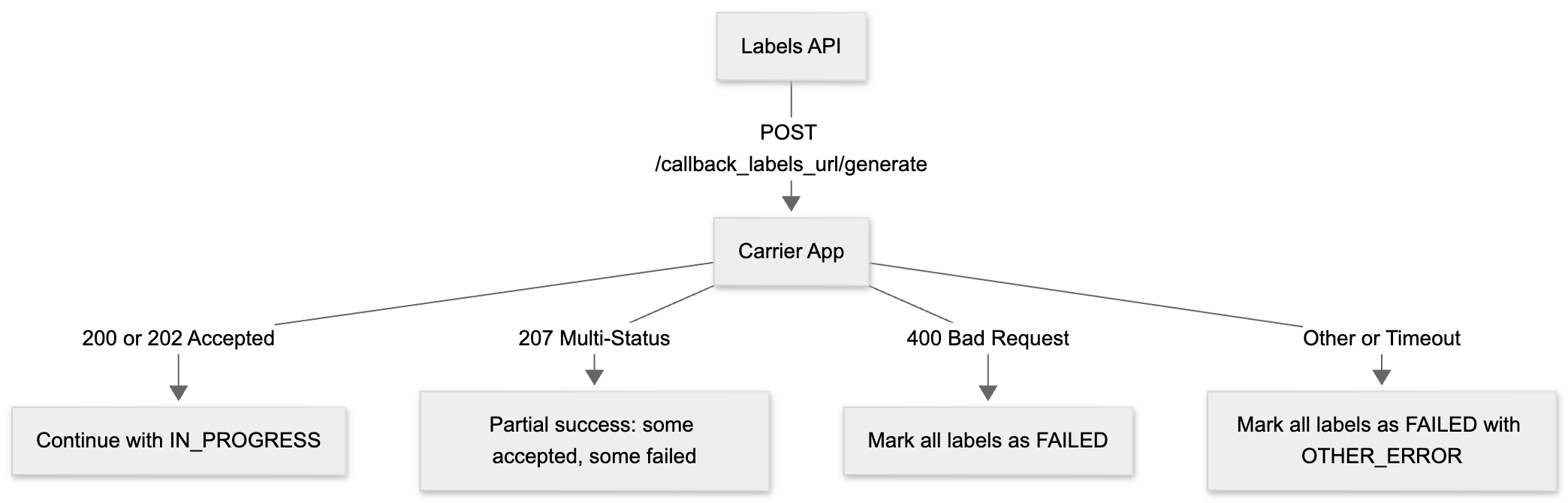
URL Structure and Compatibility
The callback_labels_url now represents a base URL. The label api system automatically appends specific suffixes based on the operation type:
| Operation | HTTP Method | Final URL Path |
|---|
| Label creation | POST | {callback_labels_url}/generate |
| Label cancellation | POST | {callback_labels_url}/cancel |
| Label suspension | POST | {callback_labels_url}/suspension |
| Label reactivation | POST | {callback_labels_url}/reactivate |
Backward Compatibility Strategy
- If the registered URL ends with
/generate:
- label api maintains it for label creation
- For cancellation, label api replaces
/generate with /cancel
- For suspension, label api replaces
/generate with /suspension
- For reactivation, label api replaces
/generate with /reactivate
- If the URL has no suffix, label api dynamically appends
/generate, /cancel, /suspension, or /reactivate as needed
Important: Carriers must implement /generate and /cancel endpoints according to the contracts defined in this documentation. Carriers may also implement /suspension and /reactivate for label suspension and reactivation flows.
Endpoint called
POST {callback_labels_url}/generate
⚠️ This is an asynchronous request. The response must indicate whether it was accepted. A timeout of 5 seconds is enforced.
Request Payload Example
[
  {
    "id": "01K1XNC0X4HA69AFA2XG2Y7Z0V",
    "status": "STARTED",
    "requested_by": {
      "app_id": "app-001",
      "user_id": "user-001"
    },
    "status_history": [
      {
        "from_status": null,
        "to_status": "STARTED",
        "happened_at": "2025-08-05T17:44:51.364Z",
        "created_at": "2025-08-05T17:44:51.364Z",
        "user_id": "user-001",
        "app_id": "app-001",
        "reason": null
      }
    ],
    "documents": [],
    "created_at": "2025-08-05T17:44:51.364Z",
    "updated_at": "2025-08-05T17:44:51.364Z",
    "fulfillment_order_info": {
      "id": "01K1XNB7ZYBV24G3K14YV3NK9E",
      "number": "1",
      "total_quantity": 1,
      "total_weight": 0,
      "total_price": {
        "value": 100,
        "currency": "BRL"
      },
      "assigned_location": {
        "location_id": "01J6A52M7PV0HWD9832XEG3AXJ",
        "name": "Distribution Center A",
        "address": {
          "zipcode": "00000000",
          "street": "Example Street",
          "number": "100",
          "floor": "",
          "locality": "District",
          "city": "Example City",
          "reference": "",
          "between_streets": "",
          "province": {
            "code": "EX",
            "name": "Example State"
          },
          "region": {
            "code": "SE",
            "name": "Southeast"
          },
          "country": {
            "code": "BR",
            "name": "Brazil"
          }
        }
      },
      "line_items": [
        {
          "id": "01K1XNB7ZYDW77JZPF8FHBCWNG",
          "external_id": "802833047",
          "quantity": 1,
          "variant": {
            "variant_id": "436300634"
          },
          "product": {
            "product_id": "113886168"
          },
          "unit_price": {
            "value": 100,
            "currency": "BRL"
          },
          "unit_dimension": {
            "weight": 10,
            "height": 10,
            "width": 10,
            "depth": 10
          },
          "stock_transfer": {
            "from_location_id": null
          },
          "created_at": "2025-08-05T17:44:25.854Z",
          "updated_at": "2025-08-05T17:44:25.854Z"
        }
      ],
      "recipient": {
        "name": "John Doe",
        "phone": "+550000000000",
        "identifier": "00000000000",
        "email": "john.doe@example.com"
      },
      "shipping": {
        "type": "ship",
        "carrier": {
          "carrier_id": "116425",
          "code": "api",
          "name": "Generic Carrier",
          "app_id": "12345"
        },
        "option": {
          "name": "Express Delivery",
          "code": "SEND",
          "reference": null,
          "allow_free_shipping": false
        },
        "merchant_cost": {
          "value": 100,
          "currency": "BRL"
        },
        "consumer_cost": {
          "value": 129.99,
          "currency": "BRL"
        },
        "min_delivery_date": "2025-08-05T17:44:25+00:00",
        "max_delivery_date": "2025-08-05T17:44:25+00:00",
        "pickup_details": null,
        "extras": {
          "phone_required": false,
          "id_required": false,
          "show_time": true,
          "shippable": true
        }
      },
      "discounts": [],
      "destination": {
        "zipcode": "99999999",
        "street": "Main Avenue",
        "number": "123",
        "floor": "",
        "locality": "Neighborhood",
        "city": "Destination City",
        "reference": null,
        "between_streets": null,
        "province": {
          "code": "SP",
          "name": "São Paulo"
        },
        "region": {
          "code": "SE",
          "name": "Southeast"
        },
        "country": {
          "code": "BR",
          "name": "Brazil"
        }
      },
      "status": "UNPACKED",
      "labels": [
        {
          "id": "01K25N0ZM0R41X9M2QAPVN2SZ0",
          "status": "STARTED",
          "requested_by": {
            "app_id": "app-001",
            "user_id": "user-001"
          },
          "status_history": [
            {
              "from_status": null,
              "to_status": "STARTED",
              "happened_at": "2025-08-05T17:44:51.364Z",
              "created_at": "2025-08-05T17:44:51.364Z",
              "user_id": "user-001",
              "app_id": "app-001",
              "reason": null
            },
          ],
          "documents": [],
          "created_at": "2025-08-05T17:44:51.364Z",
          "updated_at": "2025-08-05T17:44:51.364Z"
        }
      ],
      "fulfilled_at": null,
      "app_id": "app-001",
      "created_at": "2025-08-05T17:44:25.855Z",
      "updated_at": "2025-08-05T17:44:51.365Z"
    }
  }
]
Notes
- Array of Labels: The payload is an array where each element represents a label (FulfillmentOrderLabel model). The root
id field identifies each individual label.
- Fulfillment Order Context: The
fulfillment_order_info field contains a complete snapshot of the related Fulfillment Order, following the structure described in the FulfillmentOrder model and its subtypes.
Expected Response Codes and Label Status Management
Based on the HTTP status code returned by the shipping carrier's callback endpoint, the system will automatically update all affected labels according to the following rules:
HTTP 200 / 202 - OK / Accepted
- Label Status: All labels in the request are marked as
IN_PROGRESS
- Payload: No response payload required
- Description: The carrier has accepted the request and will process all labels asynchronously
HTTP 207 - Multi-Status (Partial Success)
- Payload Required: Must include a response payload with individual status for each label
- Payload Missing: If no payload is provided, all labels are marked as
FAILED with reason type OTHER_ERROR
- Payload Processing: Each label in the payload is processed individually:
- Labels with status
OK → marked as IN_PROGRESS
- Labels without status or with other status → marked as
FAILED
- If
reason is provided and valid → saved with the specified type
- If
reason is invalid or missing → saved as OTHER_ERROR with generic message
[
  {
    "id": "01GSB6KZXT0RTBA0CD4M4WXBSR",
    "status": "OK"
  },
  {
    "id": "01GSB6KZXT0RTBA0CD4M4WXBST",
    "status": "FAILED",
    "reason": {
      "type": "BALANCE_ERROR",
      "message": "Insufficient balance to process this label"
    }
  }
]
HTTP 400 - Bad Request
- Label Status: All labels in the request are marked as
FAILED
- Reason Processing:
- If
reason is provided and valid → saved with the specified type
- If
reason is invalid or missing → saved as OTHER_ERROR with generic message
- Description: The entire request was rejected due to invalid data or constraints
Any Other HTTP Status
- Label Status: All labels in the request are marked as
FAILED
- Reason: Always set to
OTHER_ERROR with generic error message
- Description: Unexpected or error responses are treated as complete failures
Valid Reason Types
When providing a reason in the response, the type field must be one of the valid values defined in FulfillmentOrderLabelStatusReasonType.
Retry Logic
- Retries: up to 3 times on timeout
- Backoff: 2 seconds between attempts
Webhooks
Fulfillment Order Webhooks allow applications to receive automatic notifications whenever relevant events occur in the lifecycle of a Fulfillment Order or its Labels.
Available Events
| Event | Description | When it is triggered |
|---|
fulfillment_order/status_updated | Notifies about macro status changes of the Fulfillment Order | When the Fulfillment Order status changes (e.g., PACKED, DISPATCHED, DELIVERED) |
fulfillment_order/label_status_updated | Notifies about changes in a label's status | When a label's status is updated (e.g., STARTED → IN_PROGRESS → READY_TO_USE) |
fulfillment_order/tracking_event_created | Notifies when a new tracking event is created for a Fulfillment Order | When a new tracking event of the Fulfillment Order is created |
fulfillment_order/tracking_event_updated | Notifies when a tracking event of a Fulfillment Order is updated | When a tracking event of the Fulfillment Order is updated |
fulfillment_order/tracking_event_deleted | Notifies when a tracking event is removed from a Fulfillment Order | When a tracking event of the Fulfillment Order is deleted |
Payload Structure
Webhooks fulfillment_order/status_updated and fulfillment_order/label_status_updated share a common structure with the following fields:
- store_id: ID of the store where the event occurred
- event: Name of the triggered event
- order_id: ID of the order associated with the Fulfillment Order
- fulfillment_id: Unique ID of the Fulfillment Order (ULID)
Webhooks fulfillment_order/tracking_event_created, fulfillment_order/tracking_event_updated and fulfillment_order/tracking_event_deleted send:
- store_id: ID of the store where the event occurred
- event: Name of the triggered event
- order_id: ID of the order associated with the Fulfillment Order
- fulfillment_id: Unique ID of the Fulfillment Order (ULID)
- tracking_event_id: Unique ID of the Fulfillment Order tracking event (ULID)
- status: Tracking event status (see FulfillmentOrderTrackingEventStatus)
fulfillment_order/status_updated
Triggered when a Fulfillment Order status is updated.
{
  "store_id": "5145204",
  "event": "fulfillment_order/status_updated",
  "order_id": "1822717346",
  "fulfillment_id": "01K9QFMHKYRJGQV5Y289WBYMFZ",
  "status": "DISPATCHED"
}
Payload fields:
store_id: Store IDevent: Event name (fulfillment_order/status_updated)order_id: Order IDfulfillment_id: Unique Fulfillment Order ID (ULID)status: Fulfillment Order status (see FulfillmentOrderStatus)
fulfillment_order/label_status_updated
Triggered when a label status is updated.
{
  "store_id": "5145204",
  "event": "fulfillment_order/label_status_updated",
  "order_id": "1822717346",
  "fulfillment_id": "01K9QFMHKYRJGQV5Y289WBYMFZ",
  "label_id": "01K9QQ16GPYVDHZPAEGK3SFZAC",
  "status": "FAILED",
  "reason": {
    "type": "CARRIER_ERROR",
    "message": "Carrier rejected the label"
  }
}
Example with tracking information:
{
  "store_id": "5145204",
  "event": "fulfillment_order/label_status_updated",
  "order_id": "1822717346",
  "fulfillment_id": "01K9QFMHKYRJGQV5Y289WBYMFZ",
  "label_id": "01K9QQ16GPYVDHZPAEGK3SFZAC",
  "status": "READY_TO_USE",
  "tracking_info": {
    "code": "TRACK123",
    "url": "https://carrier.example.com/track/TRACK123"
  }
}
Payload fields:
store_id: Store IDevent: Event name (fulfillment_order/label_status_updated)order_id: Order IDfulfillment_id: Unique Fulfillment Order ID (ULID)label_id: Unique label ID (ULID)status: Label status (see FulfillmentOrderLabelStatus)tracking_info: Optional label tracking information. When present, it contains code and url. The field is omitted when no tracking information is available.reason: Optional reason for the label status update. When present, it contains type and message (see FulfillmentOrderLabelStatusReason). The field is omitted when no reason is available.
fulfillment_order/tracking_event_created
Triggered when a new tracking event is created for a Fulfillment Order.
{
  "store_id": "5145204",
  "event": "fulfillment_order/tracking_event_created",
  "order_id": "1822717346",
  "fulfillment_id": "01K9QFMHKYRJGQV5Y289WBYMFZ",
  "tracking_event_id": "01K9QQ16GPYVDHZPAEGK3SFZAD",
  "status": "in_transit"
}
Payload fields:
store_id: Store IDevent: Event name (fulfillment_order/tracking_event_created)order_id: Order IDfulfillment_id: Unique Fulfillment Order ID (ULID)tracking_event_id: Unique Fulfillment Order tracking event ID (ULID)status: Tracking event status (see FulfillmentOrderTrackingEventStatus)
fulfillment_order/tracking_event_updated
Triggered when a tracking event of a Fulfillment Order is updated.
{
  "store_id": "5145204",
  "event": "fulfillment_order/tracking_event_updated",
  "order_id": "1822717346",
  "fulfillment_id": "01K9QFMHKYRJGQV5Y289WBYMFZ",
  "tracking_event_id": "01K9QQ16GPYVDHZPAEGK3SFZAD",
  "status": "delivered"
}
Payload fields:
store_id: Store IDevent: Event name (fulfillment_order/tracking_event_updated)order_id: Order IDfulfillment_id: Unique Fulfillment Order ID (ULID)tracking_event_id: Unique Fulfillment Order tracking event ID (ULID)status: Tracking event status (see FulfillmentOrderTrackingEventStatus)
fulfillment_order/tracking_event_deleted
Triggered when a tracking event of a Fulfillment Order is deleted.
{
  "store_id": "5145204",
  "event": "fulfillment_order/tracking_event_deleted",
  "order_id": "1822717346",
  "fulfillment_id": "01K9QFMHKYRJGQV5Y289WBYMFZ",
  "tracking_event_id": "01K9QQ16GPYVDHZPAEGK3SFZAD",
  "status": "delivered"
}
Payload fields:
store_id: Store IDevent: Event name (fulfillment_order/tracking_event_deleted)order_id: Order IDfulfillment_id: Unique Fulfillment Order ID (ULID)tracking_event_id: Unique Fulfillment Order tracking event ID (ULID)status: Tracking event status (see FulfillmentOrderTrackingEventStatus)
Webhook Registration
To receive notifications for these events, you must register webhooks through the Webhooks API.
See the complete Webhooks documentation for detailed information on how to create, update, and manage your webhooks.
Registration example:
{
  "event": "fulfillment_order/label_status_updated",
  "url": "https://api.partner.com/webhooks/fulfillment"
}
Required Scopes
To receive Fulfillment Order webhooks, your application must have the following scopes:
| Scope | Description |
|---|
read_fulfillment_orders | Allows receiving notifications about Fulfillment Orders |
write_fulfillment_orders | Required for write operations on Fulfillment Orders |
Important Considerations
- Idempotency: Webhooks should be implemented in an idempotent way, as the same event may be sent multiple times
- Timeout: Your application must respond within 10 seconds with an HTTP 2xx status code
- Delivery Order: Events are sent in order of emission, but may be processed asynchronously
- Security: It is recommended to validate the origin of requests using the
x-linkedstore-hmac-sha256 header (see Webhook Verification)
- Format: The request body will always be
application/json and will contain the event field
- Retries: In case of failure, the system will perform automatic retries according to the retry policy